ENGINEERING BLOG · AI AGENT COST CONTROL
7 Ways AI Agents Waste Money (and How to Spot Each in a Trace)
Your AI bill says how much you spent, not why. Agents waste money in a few repeatable ways, and each one leaves a clear signal in the trace. Here are the seven, what to look for, and how to reduce AI agent costs by alerting on them or capping them before the provider charges you.
Key takeaways
- Seven common patterns waste agent spend: runaway loops, retry storms, context bloat, a big model for small work, uncached repeated prefixes, tool output dumped into context, and multi-agent fan-out.
- Each one leaves a signal in the trace, and each needs confirming. A signal is a lead, not a verdict. Check it against the run's spans before you change anything.
- Cost is only one side of the trade. Compare cost against task success, answer quality and latency before you ship a cheaper version.
- Any Traccia policy can observe, warn or block. What differs is when it acts: a Real-Time policy acts on the current call, and an After Run policy acts on the next governed run.
To reduce AI agent costs, you first need to see which step of which run spent the money. A simple chatbot may make one model call per message. An agent plans, calls tools, reads the results, retries and sometimes hands work to other agents, and every step is billed.
A trace turns each of those steps into a span with its token counts and cost attached. Read enough runs that way and the waste stops looking random. Much of it falls into seven patterns. For each one below you get what is happening, the signal to look for, how to confirm it, and the fix to make in code. A worked example then follows one trace from before to after, and the last section covers the policies that keep a fixed pattern from coming back.
Why AI Agent Costs Are Hard to Read
Provider dashboards total spend by model and by day. They cannot tell you which agent, which run or which step caused a jump, and an agent that loops does not stop on its own. Anthropic's July 2025 statement on Claude Code limits said that "some of the biggest Claude Code fans are running it continuously in the background, 24/7," and that "one user consumed tens of thousands in model usage on a $200 plan" (quoted by Simon Willison). In June 2026 a Gartner analyst told The Register that AI coding bills had risen from $20 or $100 to between $2,000 and $5,000 per developer per month.
Traccia records cost where it happens. Each LLM span carries llm.usage.prompt_tokens, llm.usage.completion_tokens and llm.cost.usd, and the Costs view breaks spend down by agent and by model. That is enough to read every pattern below. For how cost is attributed across teams and agents, see AI Agent Cost Attribution.
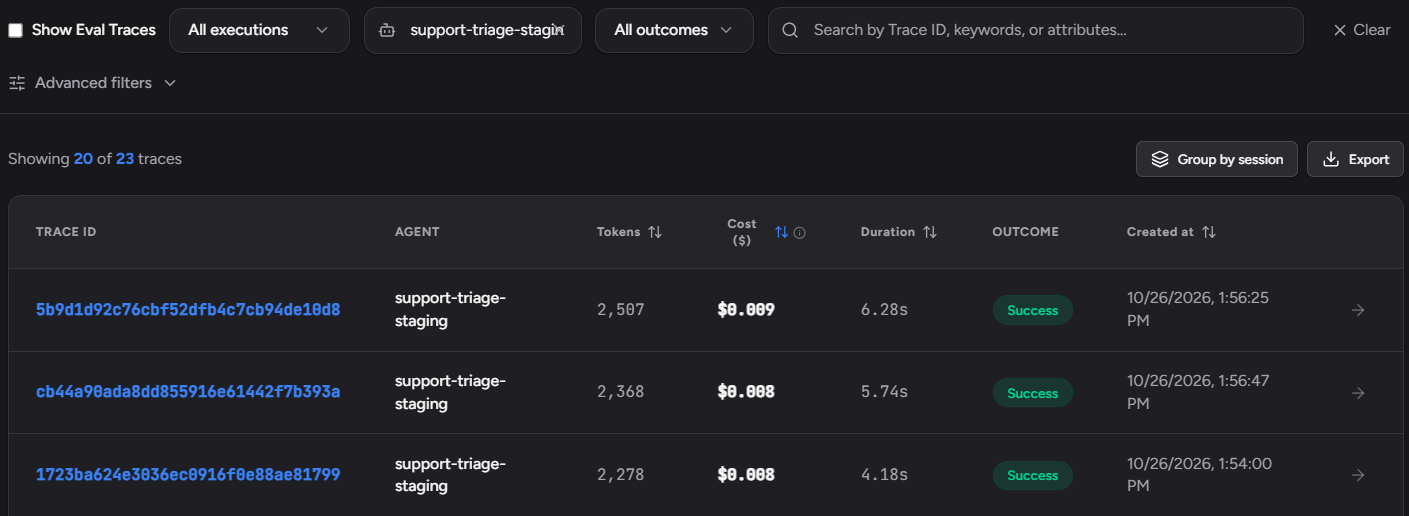
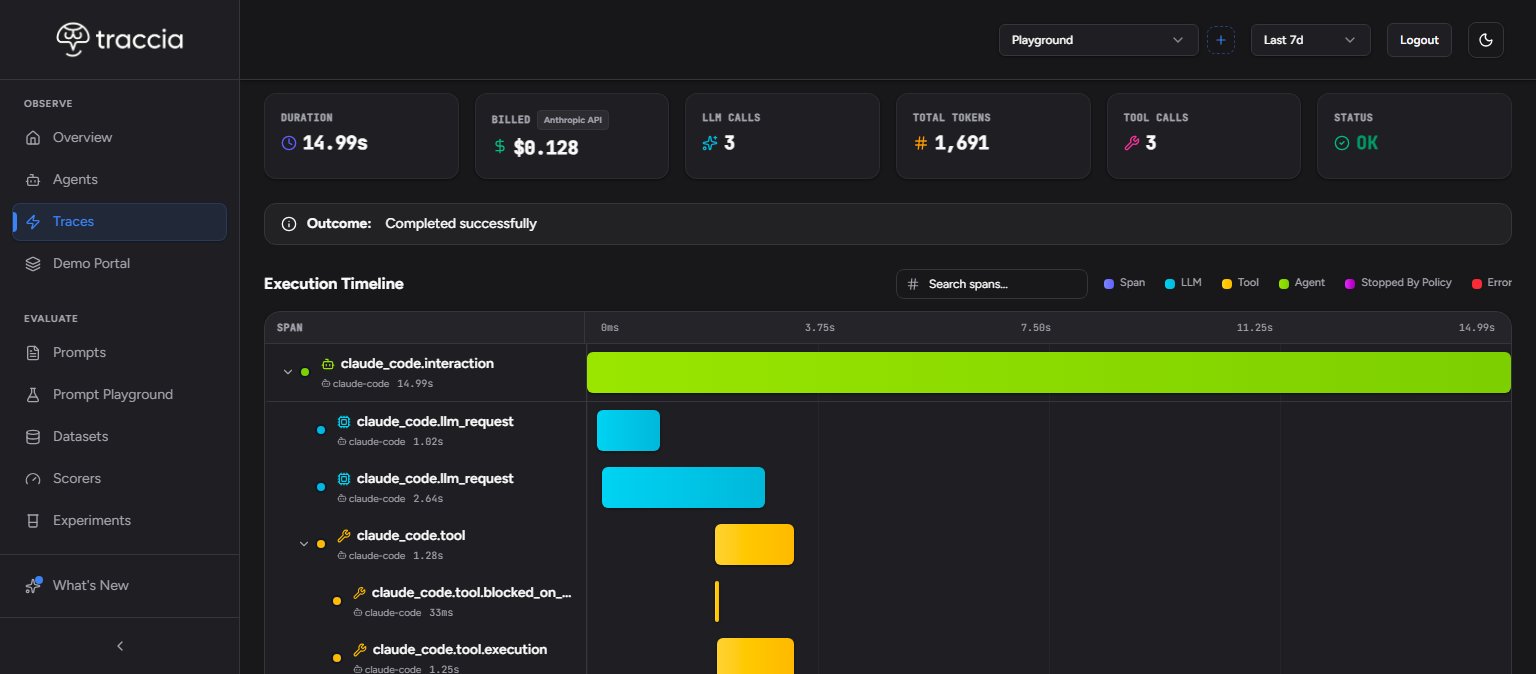
The first step is the same for every pattern: filter the Traces list to one agent, sort by cost, and open the most expensive runs. Then compare them with a typical run of the same agent. A run that costs much more than the median is where the signals below show up.
1. Runaway Loops
The agent never reaches its stop condition. It searches, decides the answer is not good enough, searches again and keeps going. Nothing crashes, so nothing pages you. The run keeps spending until it hits a timeout or someone notices.
One run with a long chain of the same tool and model spans repeating, and a cost far above that agent's typical run.
Count tool calls in the run and compare with the agent's median. Open the repeated tool spans: if the arguments barely change and the later results add nothing the answer uses, it is a loop. If each call fetched something new and the answer needed it, the task was just long.
The fix in your code: give the agent an explicit exit condition and a maximum number of steps. Then check on a dataset that the cap does not cut off tasks that legitimately need more steps.
In Traccia: Tool Storm Alert flags a run with too many tool calls. Loop Cap and a per-run Spend Cap act inside the run. See how the policies act.
2. Retry Storms
A tool fails or a rate limit hits. Instead of retrying the tool, the agent sends the whole conversation back to the model and asks it to try again. Each retry can incur another substantial model charge, so a flaky dependency quietly multiplies spend.
An error span followed by a full-size model span, then another error, then another full model span, inside one run.
Check where the error is. If it is on the tool, and the model span after it carries roughly the whole conversation as input, the retry is going through the model. Add up the cost of the spans after the first error: that is what the failure cost.
The fix in your code: retry at the tool with backoff and a small attempt limit, and fall back to a person instead of asking the model to start over. Never retry a call a policy blocked.
In Traccia: error status and cost sit on the same trace. Loop Cap counts each retried tool call toward the run's limit, and Cost Spike Alert watches the agent's total over a window.
3. Context Bloat
Many agents resend the full history on every turn: each message, each tool result, each intermediate note. Turn ten pays for turns one to nine again, so input cost grows with every step and long sessions get expensive quickly.
Prompt tokens climb turn after turn while completion tokens stay flat.
Read llm.usage.prompt_tokens on each model span of a long session and compare the last turn with the first. Then run the same sessions with trimmed history on a dataset. If answers stay as good, the old turns were cost without value.
The fix in your code: summarize or drop older turns, keep a sliding window of recent ones, and store long-lived facts outside the prompt.
The growth adds up faster than it looks. In this illustrative case the system prompt is 3,000 tokens and each turn adds 1,500 tokens of history that are resent on every later turn:
| Turn | Input tokens that turn | Input tokens so far | vs. no history |
|---|---|---|---|
| Turn 1 | 3,000 | 3,000 | 1.0x |
| Turn 5 | 9,000 | 30,000 | 2.0x |
| Turn 10 | 16,500 | 97,500 | 3.3x |
| Turn 20 | 31,500 | 345,000 | 5.8x |
In Traccia: Input Token Limit and Output Token Limit watch token counts over a window. Neither trims a prompt.
4. A Big Model for Small Work
The same frontier model that writes the final answer also decides which tool to call, classifies intent and reformats JSON. Some of those steps may not need it, and a smaller model may do them as well for much less. You find out by testing, not by assuming.
Spans on your most expensive model with short inputs and short, structured outputs.
Collect the inputs of those spans into a dataset. Run the small and the large model on it and compare pass rate, latency and cost. Switch only the steps where the small model holds up.
The fix in your code: route each step to the smallest model that passes your evaluation, and keep the large model for the steps that need it.
In Traccia: the Costs view breaks spend down by model and by agent, and Experiments compare two models on the same dataset. Model Boundary and Unapproved Model Alert keep agents on the models you approved.
5. Uncached Repeated Prefixes
A long system prompt and a list of tool schemas go out with every call. Providers discount a repeated prefix, but not in the same way. On Anthropic you opt in with cache_control; cache reads are billed at a discounted, model-dependent rate, and cache writes cost more than base input. On OpenAI, caching is "enabled by default" with cached input "discounted up to 95%," and on GPT-5.6 and later cache writes are charged too. The discount only applies when the prefix matches. OpenAI says "cache reuse requires the entire rendered prefix to match," and Anthropic says "changes at each level invalidate that level and all subsequent levels." A timestamp at the top of the system prompt can cost you the whole discount.
Large, similar prompts on every call for the same agent step. This is only a lead: the prompt token count is the same on a cache hit and a cache miss, so it cannot tell you which one you got.
Read the cached-token usage the provider returns with each response: on Anthropic, cache_read_input_tokens (read from the cache) and cache_creation_input_tokens (written to it), with input_tokens counting only the rest; on the OpenAI Responses API, usage.input_tokens_details.cached_tokens, which counts billed reads and excludes tokens charged as writes. Check how often you pay for cache writes, and work out the effective input cost per call from all of these, not from one field. Few cached tokens on a long, repeated prefix means you are missing the cache.
The fix in your code: turn on caching where your provider needs it, put stable instructions and tool definitions first, and move anything that changes per request to the end, as OpenAI recommends: "Put stable developer instructions and shared reference material first." A stable prompt version does not guarantee a hit. The rendered prefix must still match, it must reach the minimum cacheable length (1,024 tokens on many current models, and more on some), the entry must not have expired (Anthropic's default lifetime is 5 minutes; OpenAI's varies by model and setting), and request settings such as the tool list must stay the same.
In Traccia: custom pricing accepts optional cache_write and cached_prompt rates, so reported cost reflects your caching discount. Prompt management and Prompt Pin keep agents on one approved prompt version, which removes one common cause of a changing prefix.
6. Tool Output Dumped Into Context
A search tool returns twenty full documents. A database tool returns every column of every row. The agent passes all of it to the model, and the next call costs many times more than it needed to, mostly for text the model ignores.
A tool span with a very large output, followed by a sharp jump in prompt tokens on the next model span.
Compare the size of the tool output with the jump in prompt tokens on the next model span. Then check how much of that output the final answer used. If the answer cites two of twenty documents, the other eighteen were paid for and ignored.
The fix in your code: return only the fields the agent needs, cap the number of results, and summarize long output before it reaches the model.
In Traccia: the trace puts the tool span and the next model span side by side, and Input Token Limit watches the prompts that result.
7. Multi-Agent Fan-Out
An orchestrator hands one task to a researcher, a writer and a reviewer. Each re-reads the same context, and two of them run the same searches. The work did not grow, but the bill grew with the number of agents.
Sibling agent spans under one request with near-identical tool calls.
Within one trace, list the tool calls of each sub-agent and match them by name and arguments. Add up the cost of the duplicates. Then check whether each sub-agent changed the final answer; one that never does is a candidate to remove.
The fix in your code: give each sub-agent a narrow scope and pass results between agents instead of recomputing them.
In Traccia: multi-agent tracing shows the whole request as one tree with cost per agent, and any policy can be scoped to one Agent ID.
One Trace, Before and After
All numbers in this example are synthetic. They show the method, not a measured result. The prices are illustrative: $3 and $15 per million input and output tokens for the large model, $0.25 and $1.25 for the small one.
The task: a support agent answers a "where is my refund" ticket. The expensive run in the trace shows three of the patterns at once. It searched the order system five times with the same arguments (pattern 1), resent the full history on every turn (pattern 3), and used the large model to route the ticket (pattern 4).
The intervention: an exit condition once the order status is found, a history window of the last three turns, and a small model for the routing step. Before shipping, both versions ran on the same 50-ticket dataset with the same scorer.
| Before | After | |
|---|---|---|
| Model | Large model on every call | Small model routes; large model answers |
| LLM calls / tool calls | 8 / 7 | 4 / 2 |
| Input tokens | 48,000 | 9,000 large + 2,000 small |
| Output tokens | 2,400 | 900 large + 50 small |
| Cost per run | $0.180 | $0.041 |
| Quality check (50 tickets) | 46 of 50 pass | 46 of 50 pass |
| Median latency | 21s | 8s |
Cost per run fell from $0.180 to $0.041, the pass rate held at 46 of 50, and the median run got faster. If the pass rate had dropped, the right move would have been to undo the change that caused the drop, not to keep the savings.
How to Reduce AI Agent Costs: From Seeing to Stopping
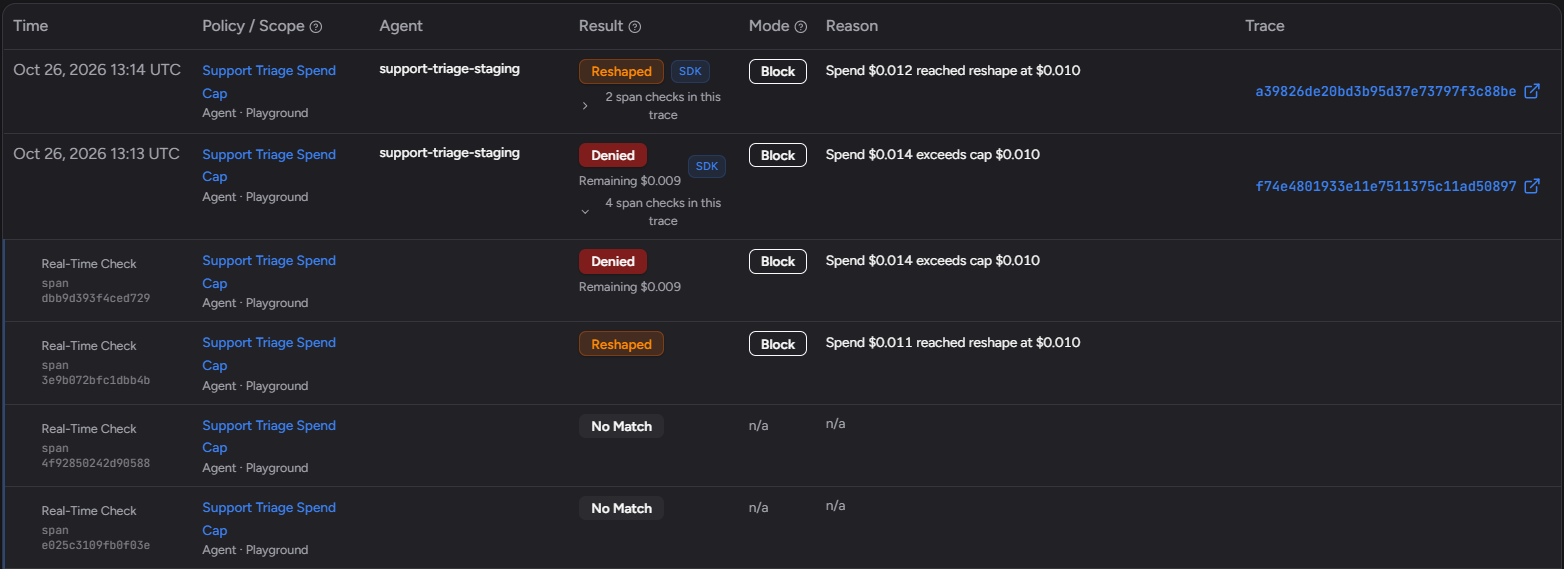
Fixing a pattern once is useful. Making sure it does not come back is better. Every Traccia policy runs in one of three modes, Observe, Warn or Block, and any template can use any mode. What differs between policies is when they act:
| Real-Time (Preventive) | After Run (Detective) | |
|---|---|---|
| When it checks | Before each model or tool call | After the trace lands, or over an hourly, daily or weekly window |
| What Block does | Denies or reshapes this call | Stops the next governed run; the finished run is not undone |
| Policies for these patterns | Spend Cap, Loop Cap, Model Boundary, Prompt Pin | Tool Storm Alert, Cost Spike Alert, Input Token Limit, Output Token Limit, Unapproved Model Alert |
| Where you look | Decision Log | Violations and Decision Log |

In the SDK, both kinds act on code wrapped in govern(): a Real-Time policy on the current call, an After Run policy on the next wrapped run. Spend Cap and Model Boundary also run on the Gateway for apps that cannot take the SDK.
from traccia import govern, initfrom traccia.governance import AgentBlockedError
init(agent_id="support-triage", agent_name="support-triage", env="production")

@govern(name="triage_ticket")def triage_ticket(ticket: dict) -> str:    # Instrumented model and tool calls inside this function are checked    # against Spend Cap, Loop Cap, Model Boundary and Prompt Pin before they run.    return run_triage_agent(ticket)

try:    reply = triage_ticket(ticket)except AgentBlockedError as exc:    # Blocked by a policy. Do not retry: send the ticket to a person.    send_to_human_queue(ticket, note=f"blocked, decision {exc.decision_id}: {exc.reasons}")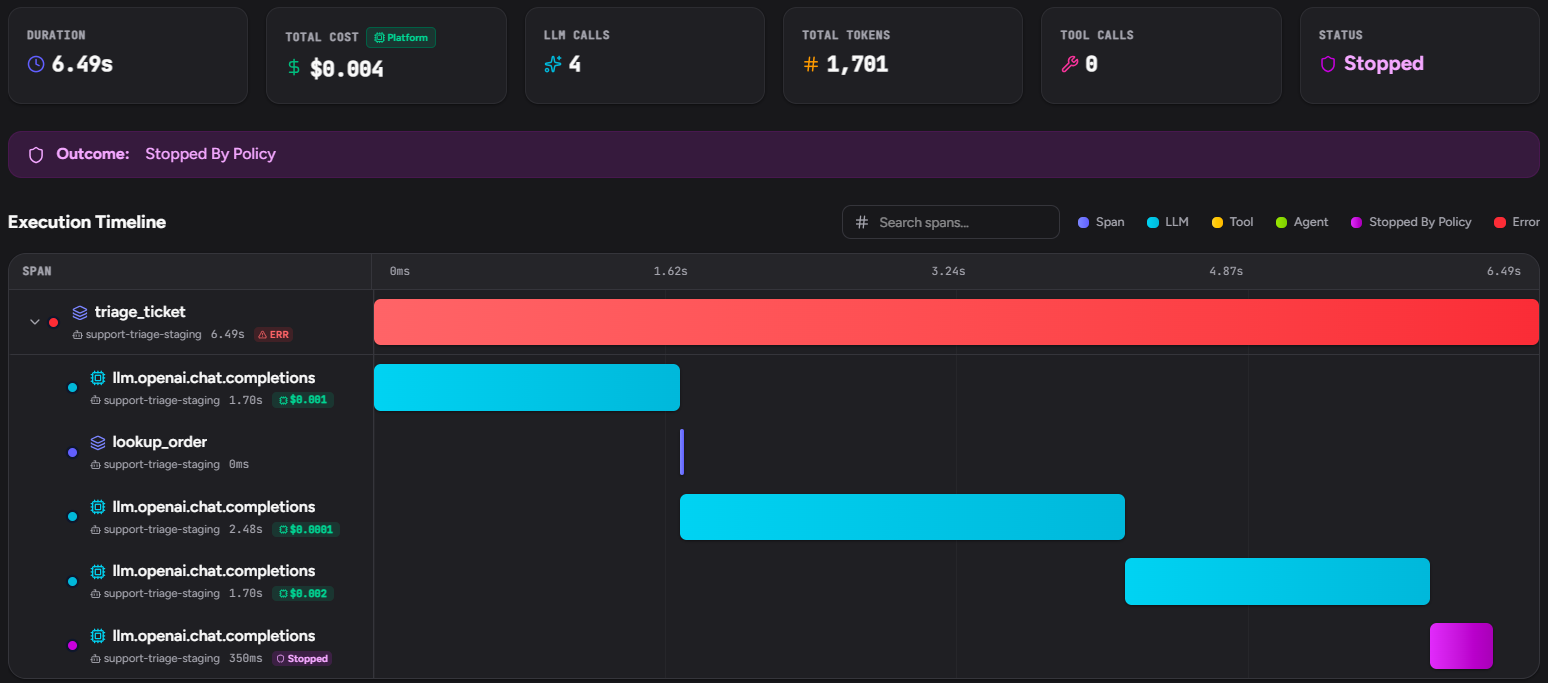
When Traccia cannot be reached
Real-Time checks fail closed. If the SDK or the Gateway cannot reach Traccia to check a call, the call is blocked by default, so a Spend Cap is never skipped silently. If staying up matters more, choose Allow calls under Settings → Policy Enforcement, for the organization or one workspace. Allow applies only to outages: when Traccia answers, a denied call is still blocked. This needs Python SDK 0.1.34 or TypeScript SDK 0.1.20 or later; older versions let calls through when Traccia cannot be reached (docs).
A practical order
Trace one agent for a week, read its most expensive runs, and match each to a pattern above. Fix the cause in code and check quality on a dataset. Then add the policy that fits in Observe, and a Spend Cap in Warn sized from your traces. Move them to Block when the Decision Log shows the matches you expected. For sizing caps step by step, see How to Set an AI Agent Spend Cap. Every active policy counts toward your plan: 1 on Free, 3 on Team and 15 on Business (pricing).
Checklist
| Pattern | Signal in the trace | Traccia |
|---|---|---|
| Runaway loops | Repeated tool and model spans in one run | Tool Storm Alert, Loop Cap, Spend Cap |
| Retry storms | Error span, then a full model call, repeated | Loop Cap, Cost Spike Alert |
| Context bloat | Prompt tokens rising every turn | Input Token Limit, Output Token Limit |
| Big model, small work | Expensive model, short structured output | Cost by model, Experiments, Model Boundary |
| Uncached prefixes | Large repeated prompts; confirm with provider cached-token usage | Cached pricing rates, Prompt Pin |
| Tool output dumped | Large tool output, then a prompt token jump | Trace view, Input Token Limit |
| Multi-agent fan-out | Sibling agents with duplicate tool calls | Multi-agent tracing, per-agent policies |
These seven patterns are a starting point, not a full list. Each one shows up in a trace, and each fix should be checked against quality and latency before it ships. For the wider case that agent spend needs its own FinOps practice, see Rethinking FinOps for Autonomous AI Agents.
Frequently asked questions
How do I reduce AI agent costs?
Trace the agent so every model and tool call carries its tokens and cost, then read the most expensive runs. Common causes are loops, retries, growing context, oversized models, uncached prefixes, large tool output and duplicate work across sub-agents. Confirm the cause, fix it in code, check quality on a dataset, and cap spend before each call with a Spend Cap.
What causes runaway AI agent costs?
Often a loop: the agent keeps calling tools and models without reaching its stop condition. In a trace it shows as the same spans repeating in one run. Loop Cap denies the next tool call once a run reaches your limit, and a per-run Spend Cap blocks a call that would put the run over budget.
Do cost alerts stop an agent from spending?
Not the run that triggered them. Cost Spike Alert, Tool Storm Alert and the token limits check traces after they land. In Observe they record a violation; in Warn or Block they warn or stop the next governed run. To stop a call before it is billed, use a Real-Time policy such as Spend Cap or Loop Cap in Block mode.
Does Traccia shorten prompts or cache them for me?
No. Input Token Limit alerts on prompt growth but "does not trim a prompt," and caching is a provider feature. Traccia shows where the tokens go and lets you set cached prices so cost is reported correctly. To check cache hits, read the cached-token usage your provider returns. Trimming history and keeping a stable prefix are changes you make in the agent.
References
Traccia docs checked November 10 and 11, 2026; provider caching pages checked November 18, 2026. The 2025 and June 2026 cases were checked October 23, 2026.
- Traccia docs
- Traccia docs: Policies
- Traccia docs: Cost Attribution & Optimization
- Anthropic: Prompt caching (checked November 18, 2026)
- OpenAI: Prompt caching (checked November 18, 2026)
- Simon Willison: Anthropic's statement on Claude Code weekly limits (July 28, 2025)
- The Register: AI coding agents could soon cost more than the developers using them (June 24, 2026)
Find the Pattern in Your Own Runs.
Trace the agent that costs you the most for a week, sort its runs by cost, and match the top few to the patterns above. Then add the policy that fits, and a Spend Cap in Warn. The Free plan includes one active policy.