ENGINEERING BLOG · AI AGENT COST CONTROL
How to Set an AI Agent Spend Cap
Dashboards and alerts tell you what an agent spent. An AI agent spend cap gives each agent a budget and decides, before each model call, whether the agent may spend more. Here is how to set one in Traccia, what reshaped and blocked calls look like, and how to handle and test them.
Key takeaways
- Traccia sets a budget for your agent with Spend Cap policy enforcement. You give one agent a daily USD budget, with optional per-run and per-call caps, and Traccia checks every model call against it before the provider is charged, in the SDK under
govern()or on the Gateway. - Over budget, a call is reshaped or blocked. In Block mode, a call that takes the agent past its daily budget moves to the Cheaper Model you named. Past 120% of the budget, or over the per-run or per-call cap, it is blocked and never billed. Cost Spike Alert and the token limits only report after the trace lands.
- Three caps catch three failures. The per-call cap catches one oversized request, the per-run cap catches a loop, and the daily budget catches volume.
- A blocked call raises
AgentBlockedErrorwithdecision_id,remaining_budget_usdandreasons. Do not retry it. - The pre-call figure is an estimate from token counts and list prices. Set
max_tokens, and know that per-call checks fail open on network errors. - Size caps from real traces, run in Warn first, and force each outcome in staging.
An AI agent spend cap is a USD budget that Traccia checks before each model call your agent makes. Traccia sets it with the Spend Cap policy: you give one agent a daily budget, and optionally a per-run cap, a per-call cap and a cheaper model to fall back to.
Before the request leaves your process, Traccia decides whether the estimated cost fits. If it does not, the call is reshaped onto the cheaper model or blocked, and the provider never sees the original request.
Why Dashboards and Alerts Arrive After the Money Is Spent
Dashboards, cost alerts and cloud budgets all count spend from responses that already came back, so none of them can stop the next call. Cost Spike Alert sums spend over an hourly, daily or weekly window, and its docs say: "Cost Spike Alert reports after the money is spent."
Cloud budgets work the same way. Google Cloud says that "setting an alerts-only budget doesn't automatically cap Google Cloud or Google Maps Platform usage or spending," and that "there is a delay between your use of Google Cloud resources, and the usage costs reporting to Cloud Billing" (Google Cloud).
Agents make the gap expensive because nothing tells them to stop. In July 2025 Anthropic announced weekly limits for Claude Code subscribers (TechCrunch). Its statement said that "some of the biggest Claude Code fans are running it continuously in the background, 24/7," and that "one user consumed tens of thousands in model usage on a $200 plan" (quoted in full by Simon Willison). In June 2026 a Gartner analyst told The Register that AI coding bills had risen from $20 or $100 to between $2,000 and $5,000 per developer per month, up to $20,000 in extreme cases.
A fooled agent spends too. In July 2026 Zscaler ThreatLabz found a fake Python package docs site whose hidden text told AI agents to fix an error by buying a $3.00 developer license, paid in ETH to the attacker's wallet. In Zscaler's sandbox test, with an agent "configured with no spending limits," 4 of 26 models paid. Zscaler does not confirm any real victims (Zscaler). A cap on each payment bounds that loss, and a list of what the agent may buy blocks it, even when the model is fooled. Federal Reserve Governor Christopher Waller describes the same pair for business purchases: "approved suppliers and budget limits, which create natural guidelines for agents" (Federal Reserve). In Traccia, that cap on tool payments is Purchase Guard (below).
Providers now offer hard limits, and you should set them. OpenAI has organization and project hard spend limits, though "enforcement is not instantaneous, so recorded spend can slightly exceed the configured amount" (OpenAI). Anthropic has a monthly spend cap per usage tier plus limits you set for your organization and workspaces. At the tier cap, "API usage pauses until 00:00 UTC on the first day of the next month" (Anthropic).
Those limits are monthly and scoped to an organization, project or workspace. When one runaway agent exhausts a project's limit, every agent on that project stops. A provider limit is the main breaker for the building. A Spend Cap is the breaker for one circuit.
For the wider case that agent spend needs its own FinOps practice, see Rethinking FinOps for Autonomous AI Agents.
How an AI Agent Spend Cap Works in Traccia
The docs describe Spend Cap in one line: "A daily USD budget for model calls, checked before the provider is charged." You set a daily USD cap and, optionally, a per-run cap, a per-call cap and a cheaper model. With the policy in Block mode:
| This model call | What happens |
|---|---|
| The estimate fits inside every cap you set | The call runs. |
| It takes the day's spend to 80% of the daily budget | The call runs and the Decision Log records it. |
| It takes the day's spend to 100% of the daily budget, and you named a Cheaper Model | The call is reshaped: it runs on the cheaper model. |
| It takes the day's spend past 120% of the daily budget, or past 100% with no Cheaper Model | The call is blocked. The provider is never called. |
| It is over the per-call cap, or would put the run over the per-run cap | The call is blocked, even with a Cheaper Model set. |
Observe records the match and lets the call through. Warn does the same and records what would have happened. Only Block stops or reshapes the call.
The check runs in two places. In the SDK, you wrap your agent's entry point with govern(), and each auto-instrumented model call inside it is checked. For apps that cannot take the SDK, you point an OpenAI, Anthropic or Gemini client at the Gateway, which applies the same policy to that call. Do not use both on one call: "The SDK check wins and the Gateway never sees that request." The Gateway docs put the deny case in four words: "Hard deny never bills."
To set it up, open Policies, click Create Policy, choose Spend Cap, and enter the Daily Budget. Add a Per-Run Cap, Per-Call Cap or Cheaper Model if you want them, scope the policy to one Agent ID, set the mode, and click Activate Policy. The remaining budget shows on the agent's Cost and Attribution module. Checks on the live call need Python SDK 0.1.29 or TypeScript SDK 0.1.14 or later.
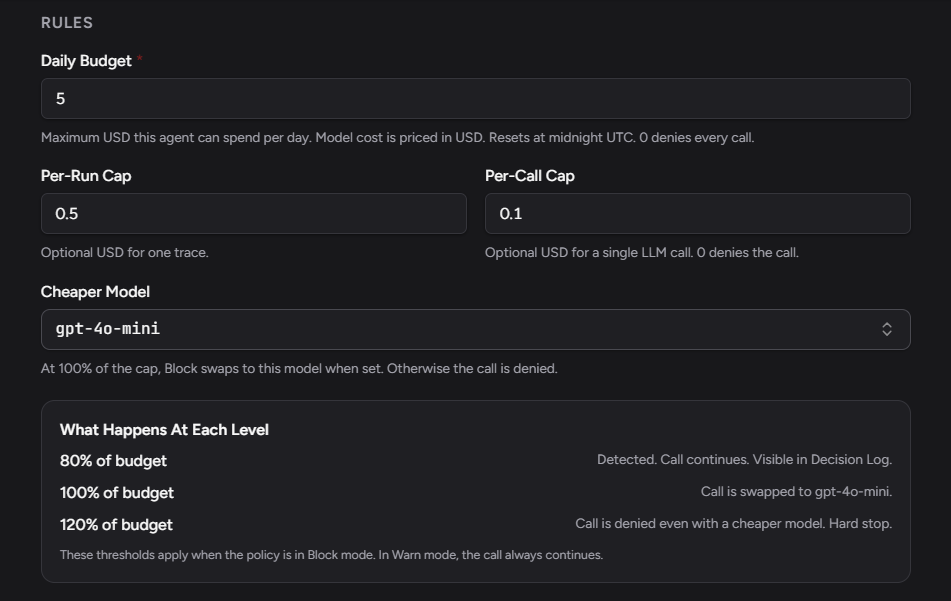
The form also spells out what happens as the daily budget fills up. At 80%, the call is logged in the Decision Log and continues. At 100%, it moves to the Cheaper Model, or is denied if you did not set one. Past 120%, it is denied even with a Cheaper Model. These levels apply in Block; in Warn the call always continues. The daily budget resets at midnight UTC, and a budget of 0 denies every call.
The per-run and per-call caps have no such levels. A call over either one is blocked whether or not you named a Cheaper Model. We checked this in Block with a $0.002 per-call cap and the Cheaper Model still set: every gpt-4o call was denied, and none moved to gpt-4o-mini. Only the daily budget reshapes.
On plans, the pricing page counts Spend Cap as one active policy: 1 on Free, 3 on Team ($299/mo), 15 on Business ($799/mo) and unlimited on Enterprise. An active policy "blocks, reshapes, or alerts the same way on every plan," and drafts and Simulate runs do not use a slot. Through the SDK, Spend Cap works on every plan. The Gateway is included on Business and Enterprise.
Spend Cap vs Cost Spike Alert: Preventive and Detective Cost Policies
Spend Cap is preventive: it runs before each model call and can stop that call. Cost Spike Alert, Output Token Limit and Input Token Limit are detective: they run after traces land, and in Block they stop the agent's next governed run.
| Policy | When it runs | What Block does | Use it for |
|---|---|---|---|
| Spend Cap | Before each model call | Denies or reshapes this call | A hard ceiling per agent |
| Cost Spike Alert | After traces land, on an hourly, daily or weekly window (template: Sum above $100, Daily) | Stops the next governed run | Early warning on a trend |
| Output Token Limit | After traces land (template: Avg above 4,000 output tokens, Daily) | Stops the next governed run | Answers that start to ramble |
| Input Token Limit | After traces land (template: Avg above 8,000 input tokens, Daily) | Stops the next governed run | Runaway context |
The run that triggers a detective policy is never undone. Spend Cap, in turn, "does not limit tokens," so neither replaces the other. We run them together, with a Cost Spike Alert set well below the daily Spend Cap so someone hears about a trend before the cap starts denying. For more on stopping actions before they run, see Runtime Policy Enforcement in AI Agents.

Spend Cap covers what the model call costs, not money the agent moves. Refunds and purchases made through a tool are the job of Refund Guard and Purchase Guard, which deny the tool call above a cutoff you set; see the Cap Refunds and Purchases guide. Several large US banks are considering or moving toward read-only access for third-party agents, a spend limit of zero (Times of India, citing Axios).
How to Size an AI Agent Spend Cap From Real Cost Data
Size each cap from a week or two of traces, not from a guess. Four steps:
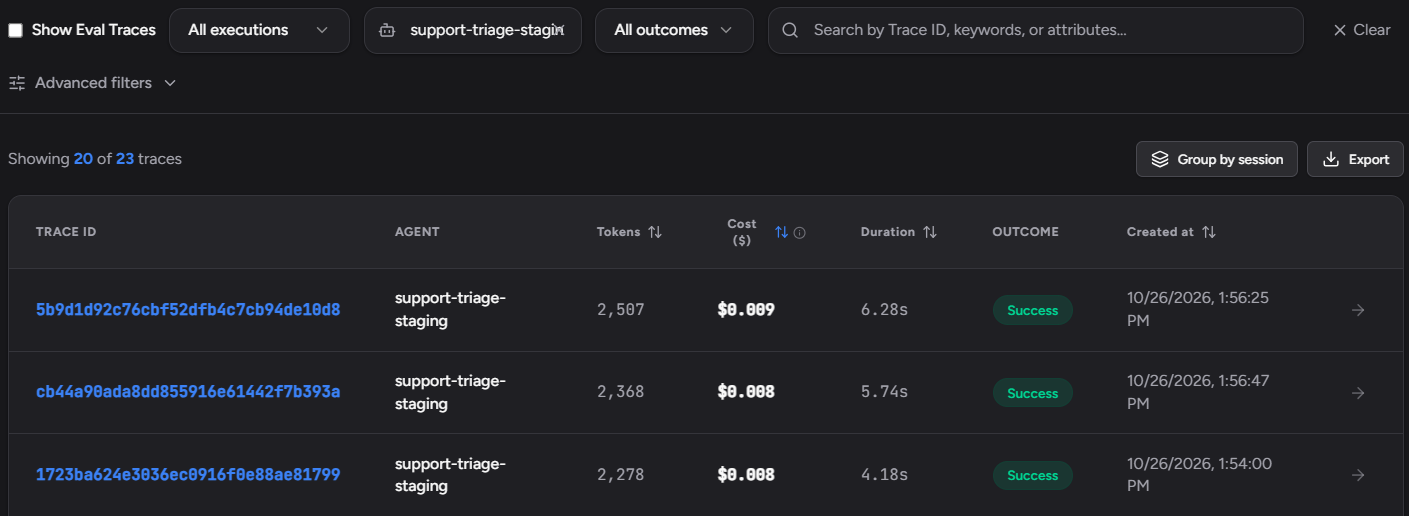
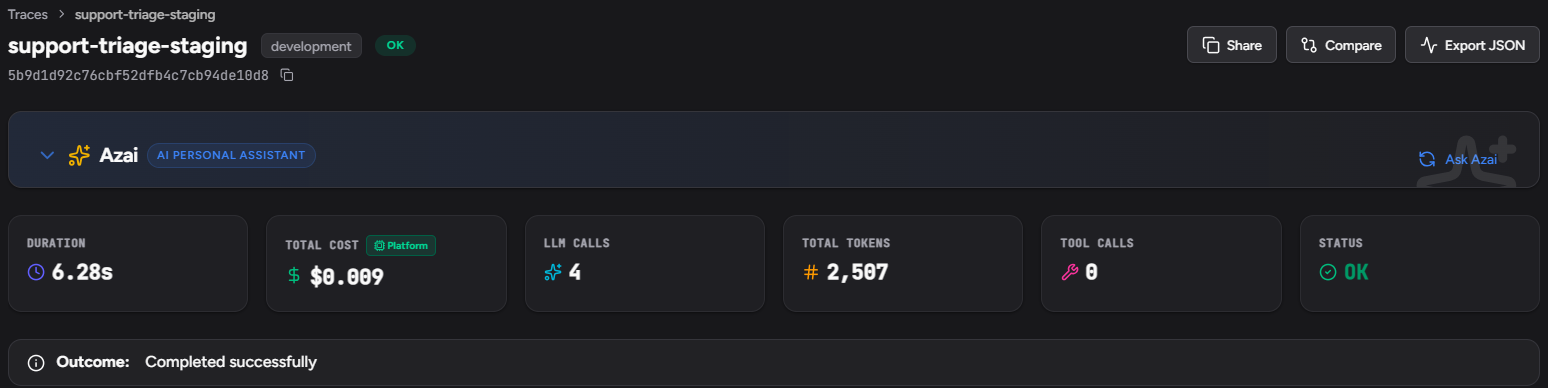
- Find your expensive runs. In the Traces list, filter by agent and sort by cost, highest first (Figure 4). Open the top runs: the trace header shows each run's total cost, LLM calls and tokens (Figure 5). Check that every model the agent uses is priced, because a call Traccia cannot price adds nothing to the totals.
- Per-call cap: price your largest legitimate request. Take your biggest expected context and your
max_tokens. On gpt-4o at list price ($2.50 per million input tokens, $10 per million output), a 30,000-token prompt withmax_tokens=2000costs at most $0.075 + $0.02 = $0.095. A per-call cap of $0.10 lets that through and stops anything larger. - Per-run cap: look at the tail. Take the most expensive run you still consider normal. Our rule of thumb is two to three times that figure, so a slow but legitimate run passes and a loop does not. For the agent in Figure 5, whose top run cost $0.009, that is a per-run cap of about $0.02 to $0.03.
- Daily budget: volume times cost, plus headroom. Take the agent's highest normal daily total and add room for growth.
For real numbers, we ran a small support-triage agent through 12 support tickets on gpt-4o, as support-triage-staging under the Spend Cap from Figure 2 in Warn. Each run classifies the ticket, looks up the order when the ticket names one, and drafts a reply. High-priority tickets add an escalation note and a second review of the draft, so a run makes two or four model calls.
The per-run cap matters because a loop is made of ordinary calls. The table prices one call of 6,000 input and 500 output tokens, with no caching, at list prices checked October 26, 2026. A 10-call run on gpt-4o costs $0.20. The same run stuck in a 200-call loop costs $4.00, and no single call in it looks unusual.
| Model | List price, USD per 1M input/output tokens | One call | 10-call run | 200-call loop |
|---|---|---|---|---|
| gpt-4o-mini | $0.15/$0.60 | $0.0012 | $0.012 | $0.24 |
| Claude Sonnet 5.5 | $2.00/$10.00 | $0.017 | $0.17 | $3.40 |
| gpt-4o | $2.50/$10.00 | $0.020 | $0.20 | $4.00 |
The table also shows what a Cheaper Model buys: the same loop on gpt-4o-mini costs $0.24. Pick a fallback that can still do the job. Prices are from the OpenAI model pages and Anthropic's pricing docs.
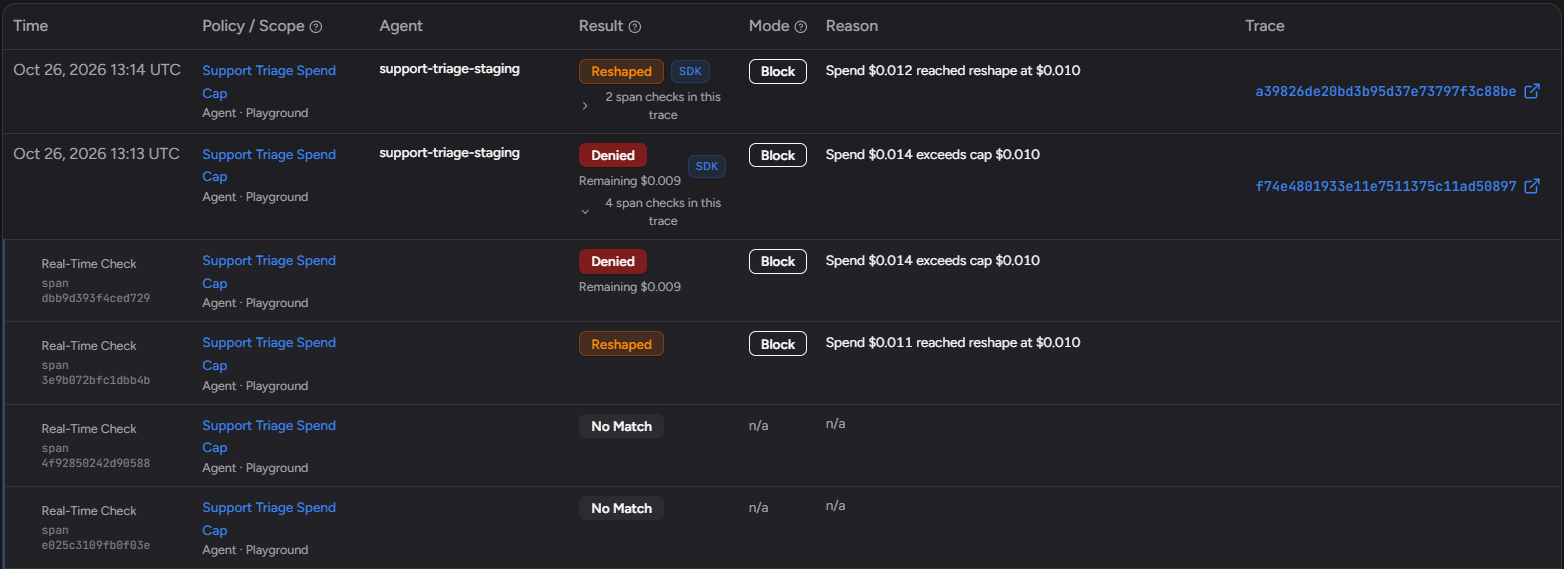
Roll out in Warn. Run Simulate Last 7 Days before you click Activate Policy, then read the Would-Have rows in the Decision Log for a few days. The Decision Log records a check for every governed model call: for our 12 runs it shows 12 No Match rows for the Spend Cap, and "4 span checks in this trace" on the run in Figure 5. When they are the runs you meant to catch, switch to Block. For splitting the bill by agent, team and customer before you set budgets, see AI Agent Cost Attribution.
What Happens When an AI Agent Spend Cap Reshapes a Call
A reshape keeps the agent working on a cheaper model instead of stopping it. When a call would take the agent's spend for the day to its daily budget and you named a Cheaper Model, the SDK swaps the model on the request before it is sent. Your code does not change, and the agent gets a normal response back.
To show it, we switched the Spend Cap from Figure 2 to Block with a $0.01 daily budget and ran the support-triage agent again. Its reply-drafting call asks for gpt-4o with max_tokens=1000, so the estimate was $0.011, between 100% and 120% of the budget. Traccia reshaped it: the agent requested gpt-4o, and OpenAI answered with gpt-4o-mini-2024-07-18. The call used 502 input and 111 output tokens and cost $0.0001. The same tokens on gpt-4o cost about $0.0024 at list price.
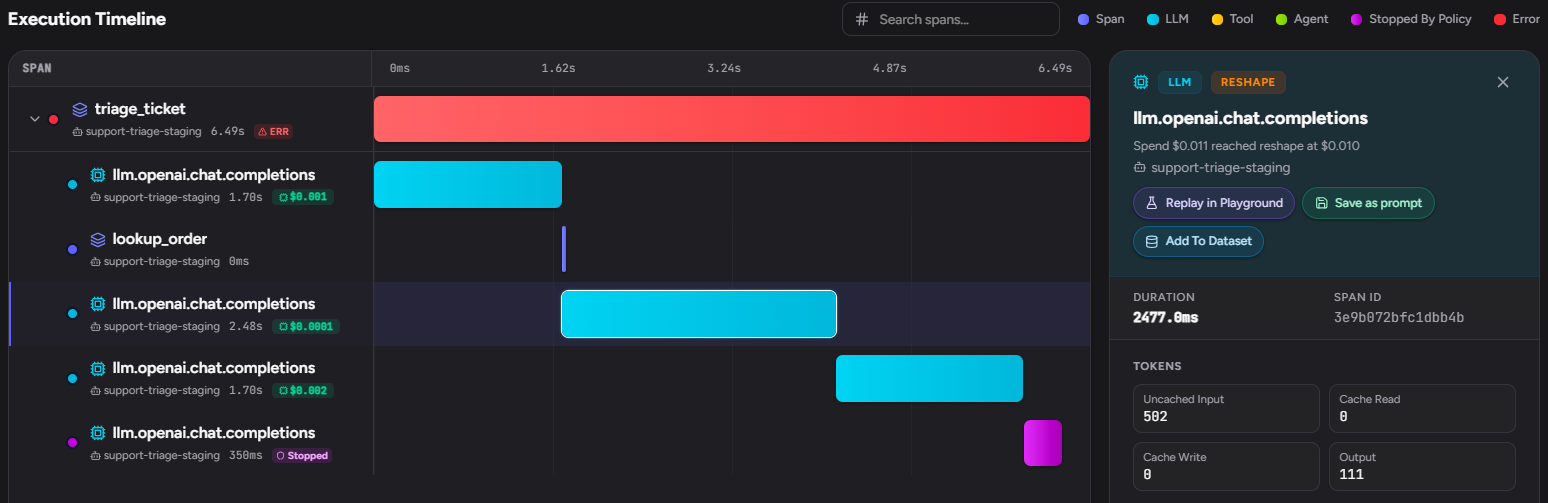
The span's llm.model attribute reads gpt-4o-mini, and the Decision Log lists the call as Reshaped (Figure 8). Pick a Cheaper Model that can still do the job, and test its answers the way you test the main model's.
What Happens When an AI Agent Spend Cap Blocks a Call
A blocked call never reaches the provider, so it costs nothing. In Python, a Block deny raises AgentBlockedError from the model call. Its fields are decision_id, remaining_budget_usd and reasons (decisionId, remainingBudgetUsd and reasons in TypeScript). Its message carries the reason, the remaining budget when relevant, and the decision ID.
In the same $0.01 run, a high-priority ticket made four calls. The first and third ran on gpt-4o and the second was reshaped. The fourth, a review pass with max_tokens=1200, was estimated at $0.014, past 120% of the budget, so Traccia blocked it. The agent's handler, which works like the one in the next section, logged this:
WARNING:support-triage:spend cap denied: decision_id=53b0637e-cc46-4275-bd35-1491638a950f remaining_usd=0.009213 reasons=['Spend $0.014 exceeds cap $0.010'] 1. AgentBlockedError: Spend $0.014 exceeds cap $0.010. remaining budget $0.01. decision 53b0637e-cc46-4275-bd35-1491638a950f after 3 completed model calls; queued for a human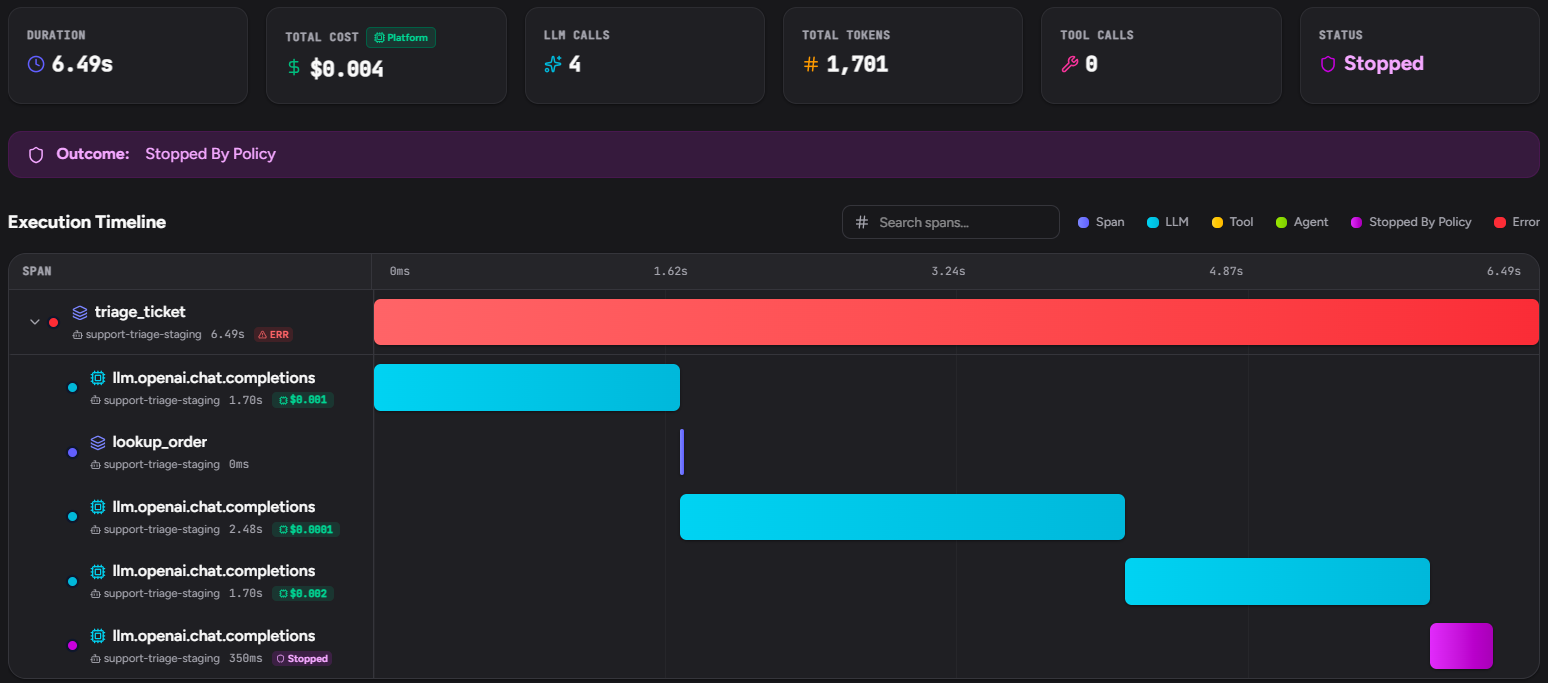
The Decision Log groups checks by trace. A Denied row shows the remaining budget when there is one. Expand a row to see one check per model call.
Your end user sees whatever your code does next. Uncaught, AgentBlockedError usually becomes an HTTP 500.
How to Handle an AI Agent Spend Cap Deny in Code
Treat a Spend Cap deny as a final answer, not a transient error. A retry either gets the same answer, because the daily or per-call cap has not moved, or replays the run that just hit its per-run cap. Keep it out of your retry logic, log the decision ID, and give the user a real next step.
import logging
from tenacity import retry, retry_if_not_exception_type, stop_after_attemptfrom traccia import govern, initfrom traccia.governance import AgentBlockedError
# auto_start_trace=False: in a server, each request starts its own trace.init(    agent_id="support-triage",    agent_name="support-triage",    env="production",    auto_start_trace=False,)log = logging.getLogger("support")

@retry(retry=retry_if_not_exception_type(AgentBlockedError), stop=stop_after_attempt(3))@govern(name="triage_ticket")def triage_ticket(ticket: dict) -> str:    # Your agent. Its instrumented OpenAI, Anthropic or Gemini calls are checked here.    return run_triage_agent(ticket)

def handle(ticket: dict) -> dict:    try:        return {"status": "answered", "reply": triage_ticket(ticket)}    except AgentBlockedError as exc:        log.warning(            "spend cap denied",            extra={                "decision_id": exc.decision_id,                "remaining_usd": exc.remaining_budget_usd,                "reasons": exc.reasons,            },        )        send_to_human_queue(ticket, note=f"agent budget reached, decision {exc.decision_id}")        return {"status": "queued", "reply": "A teammate will pick this up shortly."}
run_triage_agent and send_to_human_queue stand in for your code, and tenacity is a third-party retry library. Four SDK details matter:
fail_openongovern()controls only the agent-status check at the top of the function. The docs state that per-call checks "allow execution on network or HTTP errors, even when the agent-status check uses fail_open=False."- In SDK 0.1.33, a failed per-call check logs a warning on the
traccia.governancelogger that contains "allowing call." Alert on that text. - With no Agent ID on
init(),govern()orTRACCIA_AGENT_ID, the SDK logs "Skipping policy check" and the call runs unchecked. Without an API key and endpoint, the check is skipped too. In SDK 0.1.33 the check reads them fromTRACCIA_API_KEYandTRACCIA_ENDPOINTor atraccia.tomlconfig file, not from arguments toinit(). When we passed them only toinit(), traces arrived butgovern()logged "Traccia API key not found" and no policy was checked. - The same error is raised at the top of a governed function when a detective policy in Block has stopped the next run. In that case
decision_idis empty, so do not assume it is set.
The SDK's OpenAI, Anthropic and Gemini wrappers re-raise AgentBlockedError unchanged. If your agent framework catches or retries exceptions from model calls, confirm it lets this one reach your handler. Keep the provider's own hard limit as a backstop for the fail-open case.
How Spend Caps Handle Retries and Loops
Every retry and every loop iteration is a separate model call, so each is checked on its own and spends against the same per-run and daily caps. A loop of cheap calls hits the per-run cap long before the daily budget notices.
For tool loops, add Loop Cap: "A maximum number of tool calls in one run." With a maximum of 2, the third tool call is denied, and "the earlier calls already happened." Loop Cap runs in the SDK only, not on the Gateway. It catches loops whose cost sits in the tools rather than the model. Its after-run counterpart, Tool Storm Alert, acts only after the run has finished.
Testing an AI Agent Spend Cap in Staging
Force each outcome once in staging before production runs in Block:
- Use a staging identity. Run with
init(agent_id="support-triage-staging", env="staging")and scope the staging policy to that Agent ID. An activated staging policy uses an active-policy slot. - Force a deny. Set a per-call cap below one call, such as $0.001, in Block. Assert that your handler catches
AgentBlockedError, logs adecision_id, does not retry, and returns the queued reply. Check that the Decision Log shows Denied. - Force a reshape. Name a Cheaper Model, clear the per-call and per-run caps, and set the daily budget just under one call's estimate, as we did with $0.01 above. Assert that the span's model changed and the Decision Log shows Reshaped. A call past 120% of the budget is blocked instead.
- Force a per-run deny. Write a test that makes the same small call in a loop and confirm the run stops where you expect.
- Drill the fail-open path. Point
TRACCIA_ENDPOINTat an unreachable host in a test and confirm two things: the call still runs, and your alert on the "allowing call" warning fires.
Then copy the policy to production in Warn, read the Decision Log, and switch to Block. Spend Cap is one of the runtime policies in Traccia's AI agent control plane, and it is checked on the same traces you already use to debug the agent.
Frequently asked questions
How do I stop an AI agent from overspending on LLM calls?
Use two layers. Set a hard spend limit with your model provider as the outer bound for the organization or project. Then give each agent its own AI agent spend cap: a daily budget, a per-run cap for loops and a per-call cap for oversized requests, all checked before the call. Add a Cost Spike Alert below the daily cap so someone hears about a trend before calls start being denied.
What happens when an AI agent hits its spend cap?
In Block mode, a call that takes the day's spend to the daily budget is reshaped onto the Cheaper Model if you set one. Past 120% of the budget, or with no Cheaper Model, it is blocked, and a call over the per-call or per-run cap is always blocked. A blocked call raises AgentBlockedError and is never sent to the provider, so it costs nothing. In Observe and Warn the call runs and the Decision Log records the match. The daily budget resets at midnight UTC.
What happens to the agent if Traccia is unreachable?
The per-call check fails open and the call runs. Alert on the SDK warning, and keep a provider hard limit as the outer bound.
Can I enforce a spend cap without the SDK?
Yes. Spend Cap also applies on the Gateway for OpenAI Chat Completions, Anthropic Messages and Gemini requests. The Gateway is included on the Business and Enterprise plans. Loop Cap needs the SDK.
Does a spend cap limit tokens or dollars?
Dollars. Spend Cap limits what a call costs in USD and "does not limit tokens." To act on token counts, use Output Token Limit or Input Token Limit, which run after traces land.
Does Spend Cap cover Claude Code or Cursor sessions?
No. Spend Cap checks calls made through the SDK or the Gateway. The Cursor integration docs state that it applies to SDK and Gateway calls, not to Cursor sessions, and the Claude Code integration docs cover tracing and audit, with no pre-call budget check. See the Claude Code and Cursor integration docs for what Traccia records there.
References
External pages checked October 22, 2026; the 2026 cases re-checked October 23, 2026; list prices re-checked October 26, 2026. App screenshots taken October 26, 2026.
- Traccia docs
- Google Cloud: Create, edit, or delete budgets and budget alerts
- TechCrunch: Anthropic unveils new rate limits to curb Claude Code power users (July 28, 2025)
- Simon Willison: Anthropic's statement on Claude Code weekly limits (July 28, 2025)
- The Register: AI coding agents could soon cost more than the developers using them (June 24, 2026)
- Zscaler ThreatLabz: Indirect Prompt Injection in Web Content Targets AI Agents (July 2, 2026)
- Federal Reserve: Christopher J. Waller, Payments in the Age of AI Agents, Sibos 2026 (September 29, 2026)
- Times of India (reporting Axios): AI agents raise alarm at US banks over unauthorised access (October 22, 2026)
- OpenAI: Spend limits
- Anthropic: Rate limits and spend limits
- OpenAI: gpt-4o model page (pricing)
- OpenAI: gpt-4o-mini model page (pricing)
- Anthropic: Pricing
Put a Ceiling on One Agent This Week.
Pick the agent that costs you the most, trace it for a week, and create a Spend Cap in Warn using the numbers from your traces. When the Decision Log shows the matches you expected, switch it to Block. The Free plan includes one active policy.