Policies
Preventive policies can deny or reshape this LLM or tool call. Detective policies record after traces land. Ingest never rejects a trace.
Policies are named rules you set in the Traccia app. Get your API key from app.traccia.ai only.
Every policy is either Real-Time (it can stop a call) or After Run (it records and alerts). The table below shows the difference. Ingest never rejects a trace because of a policy.
Policies vs Compliance Hub
Preventive vs Detective
| Type | When it runs | What Block does | Where you look |
|---|---|---|---|
| Real-Time (Preventive) | Before each LLM or tool call, through @govern() and auto-instrumented spans, or through the Gateway for Spend Cap and Model Boundary. | Deny or reshape this call. Observe and Warn still let the call through and record a match. | Decision Log. No Violations tab. Remaining budget for Spend Cap is on the agent Cost and Attribution module. |
| After Run (Detective) | After the trace is ingested, or on a rolling window (Hourly, Daily, or Weekly) using AVG, SUM, MAX, MIN, P95, or similar. | Arm the next @govern() wrap. The run that already finished is not undone. Traces are still accepted. | Violations (the to-do list) and Decision Log (the history). Evaluate Now can replay Per Trace rules. |
Scope a policy to the organization, a workspace, or one agent. Agent scope uses the Agent ID you pass to init() (or TRACCIA_AGENT_ID). You can reserve that ID before the first trace. The reserved name shows as Declared on Agents until a successful ingest promotes it.
Templates
Create Policy opens What Do You Want To Protect? The templates are grouped the same way as the table above. Back returns you to Policies.
Real-Time (Preventive)
These run before the call finishes. Open one to see what it does, what you set, and what your agent has to send. Spend Cap and Model Boundary also work through the Gateway. The rest need the SDK and govern().
Spend Cap
A daily USD budget for model calls, checked before the provider is charged.
Model Boundary
Only the models you list. Deny the call, or move it to a fallback model.
Loop Cap
A maximum number of tool calls in one run.
Refund Guard
Deny refunds above a cutoff. Optionally ask a person about the middle band.
Purchase Guard
Deny orders and buys above a cutoff. Optionally ask a person about the middle band.
High-Risk Tool
Deny a tool by name, such as delete_account, before it runs.
Dangerous Shell Commands
Deny a shell tool when its command contains text you listed, such as rm -rf.
Freshness Guard
Deny a write when the data the agent read is older than your limit.
Retrieval Completeness
Deny an answer when the agent did not search, or got too few chunks back.
Unique Customer Cap
Deny the next new customer once too many distinct customers were opened in a window.
Prompt Pin
Deny a model call when a Traccia prompt was loaded from the wrong label or version.
After Run (Detective)
These check traces after they land and open a violation when a limit is crossed. They do not undo the run that already finished. Each one starts from sensible values you can change.
Cost Spike Alert
Total spend over an hour, a day, or a week passes a limit. This is not Spend Cap.
Slow Run Alert
Runs take longer than they should, measured as P95, average, or slowest.
Tool Storm Alert
One run made too many tool calls. Use Loop Cap to stop a run live.
Unapproved Model Alert
A run used a model outside your list. Use Model Boundary to stop the call.
Output Token Limit
Responses run longer than your token budget.
Input Token Limit
Prompts grow past your token budget, such as runaway context.
Error rate is not a policy metric yet. Observe, Warn, and Block are available on every template, but they do not mean the same thing for Preventive and Detective rules.
Draft, Activate, And Enforcement
The wizard is three steps: pick a template, configure (name, scope, rules, mode, notifications), then Review. Review has two save actions: Save Draft and Activate Policy. Draft is stored and not evaluated. Activate turns the policy on with the mode you set on Configure.
| Choice | What happens |
|---|---|
| Save Draft | Store the policy. It does not evaluate until you activate it. |
| Activate Policy | Turn the policy on with the enforcement mode you picked. |
| Observe | Log matches. Email if Alerts is On. Does not stop the agent. |
| Warn | Same logging, with Would-Have recorded. Preventive templates continue this call. Detective templates warn on the next @govern() wrap. Traces are still accepted. |
| Block | Preventive templates deny or reshape this LLM or tool call. Detective templates stop the next @govern() wrap. Traces are still accepted. |
Preventive Block raises AgentBlockedError on this call when the SDK cannot reshape. Remaining budget is on the agent Cost and Attribution module. Detective Warn and Block stay lagged through @govern().
Graduated Escalation
Simulate Last 7 Days
On Review, run Simulate Last 7 Days before you turn the policy on. Traccia replays the draft against last week's traces and reports how many matched, for example 12 of 847 traces matched this draft. Simulate does not save the policy. A large replay is capped at 5,000 traces in this request.
Decision Log
Open Decision Log from Policies. This is the history of evaluations, grouped by trace, including quiet No Match rows so you can see the rule is working, not broken. Each row shows the Mode that was in force at check time (Observe, Warn, or Block). Violations stay the to-do list for Detective policies.
| Badge | Meaning |
|---|---|
| Matched | The rule matched this run. Helper: Detected only. This run was not stopped. |
| No Match | The rule was evaluated and did not match. |
| Denied | This LLM or tool call was denied under Preventive Block. Remaining budget is shown when present. |
| Reshaped | This call continued on a cheaper or fallback model. |
| Queued | Refund Guard or Purchase Guard held this call for a person. The tool did not run. |
Each row shows the agent name with a smaller agent ID, and a trace link to the run. Span detail shows the same Matched or No Match badge when a stored span has policy attributes.
Violations
Detective policies have a Violations tab. Preventive policies do not open violations. Expand a row to see how the metric was calculated and the lifecycle events for that row.
| Status | Meaning |
|---|---|
| Open | The rule was exceeded and the row still needs attention. |
| Acknowledged | Someone reviewed the row. Trace events stay on the record. |
| Resolved | A person closed an Aggregate row. |
| Auto Resolved | An Aggregate window metric fell back within the limit in the same evaluation window. |
- Per Trace rows: use Acknowledge when reviewed. You cannot Resolve them. A later compliant trace does not close an earlier Open row.
- Aggregate rows: Acknowledge or Resolve. Auto Resolve only applies to the current window, and the lifecycle shows why it cleared (the value at Auto Resolve when that value was recorded).
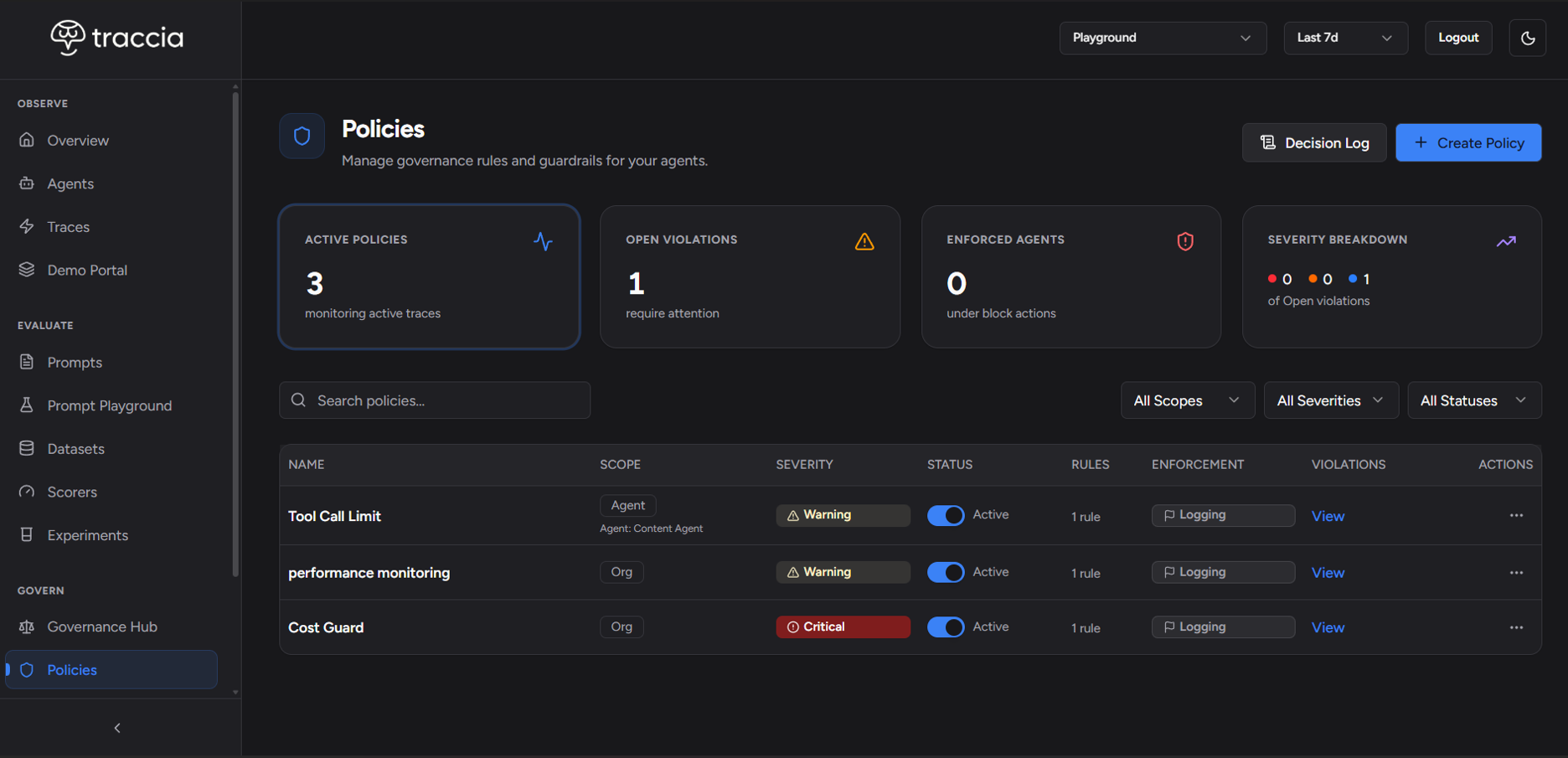
The Policies list shows Active Policies, Open Violations, Enforced Agents (agents with at least one Open violation), and a Severity Breakdown of those Open rows. Click a card to open that list.
On an active Detective Per Trace policy, Evaluate Now replays the rule against recent traces and opens missing violation rows. Preventive policies do not offer Evaluate Now. When a Detective Warn or Block has armed the next wrap, the policy Decisions tab lists those Next Run Stops with a trace link for that wrap.
Email Alerts
Email Alerts sit on the policy and default to Off. Detective policies email after a violation becomes Open, usually within about 30 seconds. Preventive policies email after a deny, reshape, or Would-Have match. Repeat mail for the same Open Detective row waits for the policy Cooldown Period. Acknowledged, Resolved, and Auto Resolved rows do not send.
| Plan | Who receives mail | Daily cap (UTC) |
|---|---|---|
| Solo | Your verified account only. | 20 |
| Team | Organization admins. | 50 |
| Enterprise | Up to 10 verified members you select on the policy. | 200 |
Test emails share the same daily cap. Recipients must be verified members of the organization. There is no free-text address field.
Creating a Policy
- Go to Policies in the app.
- Click Create Policy.
- Pick what you want to protect. Back returns you to Policies.
- Set name, scope (organization, workspace, or Agent ID), rules, Observe / Warn / Block, and Email Alerts.
- On Review, optionally Simulate Last 7 Days, then Save Draft or Activate Policy.
Stop this call
@govern() (Python) or govern() (TypeScript), set agent_id on init() only, use auto-instrumented LLM and tool spans, and activate a real-time policy in Block. You do not add a separate check() in agent code. Get your API key from app.traccia.ai.Next Steps
© 2026 Traccia.