ENGINEERING BLOG · CURSOR
Cursor Observability: Every Chat, Tool Call, and Dollar
Cursor's agent edits files, runs your terminal and calls MCP servers, then tells you it is done. Install one set of hooks and every chat becomes a session in Traccia: the prompt, each tool call with its input and output, the tokens, and a cost with a label that says what the number is.
Key takeaways
- The risk is the whole environment, not just the model. In 2026, a tampered marketplace extension reached up to 5,000 Cursor users, and Cursor disclosed two vulnerabilities: a sandbox escape through Git hooks and a command allowlist bypass through prompt injection. Each involved a different part of the editor.
- Setup is one command. Run
npx traccia-coding-harness install cursor, paste your ingestion key, restart Cursor. No SDK, no collector, no change to your repositories. - One chat is one session, one message is one trace. Shell, MCP and file tools are one span each, with input and output together. A failed tool stays on its span even when the turn shows Success.
- Every cost has a label. Parent Turn Estimate is an API list price. Save a team admin key and it becomes Cursor Billed. Auto mode stays Unpriced.
- Know the boundary. Traccia sees what Cursor's agent does through its hooks. It does not see extensions, Git helpers or anything else running beside the agent, and it does not stop commands. Cursor's run modes and sandbox do that.
Cursor observability means sending what Cursor's agent did to one place and reading each chat as a session: the model turns, shell commands, MCP calls, file edits and subagents, with the tokens and cost behind them. It answers the question every developer eventually asks: what exactly did the agent do, and what did it cost?
The limit
Why Cursor Observability Matters: One Incident, Two Vulnerabilities
Cursor is an editor, an agent, an extension host and a terminal in one window. In 2026, three security problems each involved a different one of those layers. The first was a real incident that reached users. The other two are vulnerabilities Cursor disclosed and fixed; its advisories do not report attacks against users. Each one below ends with what a trace would, and would not, show.
1. A tampered extension in Cursor's marketplace
On October 29, 2026, a modified build of Anthropic's Claude Code extension, version 2.1.313, was available in Cursor's extension marketplace for about 11 hours, from roughly 09:27 to 20:35 UTC. Cursor says it affected at most 5,000 users. According to Phorion's analysis, reported by Sophos, the extension added an attacker-controlled SSH key to authorized_keys, tried to open a reverse SSH tunnel, set up persistence and sent host details to the attacker.
Cursor removed the version, shut down the marketplace as a precaution, checked other extensions, rotated its keys and then restored it. Anthropic said the build was not one it made or published. Sophos warns that uninstalling the extension leaves the backdoor in place: affected machines need the key, persistence and tunnel removed and their credentials rotated.
Nothing, and that is the point of starting here. An extension runs in Cursor's extension host, not through the agent's hooks, so its activity never becomes a span. Your AI development environment is only as trustworthy as everything running inside it, and agent observability covers the agent, not the rest of the editor. See What Traccia Cannot See or Stop.
2. A vulnerability: sandbox escape through Git hooks
Cursor's advisory for CVE-2026-26268, published February 13, 2026, describes a sandbox escape in versions before 2.5. A malicious agent, for example one steered by prompt injection, could write to poorly protected .git settings, including Git hooks. Those hooks would then run outside the sandbox the next time Git triggered them, with no user interaction. It was fixed in Cursor 2.5. The advisory does not report attacks against users.
If this were exploited, the agent would leave a trail. The write under .git/hooks/ is a tool call, and so is the git status or git commit that sets it off. The hook running afterwards is Git's doing, not the agent's, so it would not be a span.
3. A vulnerability: prompt injection past the allowlist
Cursor's advisory for CVE-2026-31854, published March 9, 2026, describes instructions hidden on a website that could lead the agent to run commands, combined with a bypass of the command allowlist. Commands could run without the user's consent even with the allowlist on. It was fixed in Cursor 2.0. The advisory does not report attacks against users.
If this were exploited, the step that read the page and the shell command that followed it would sit in the same turn, one span after the other, each with its input and output.
A trace would not prevent any of these. A patch, a sandbox, a tighter run mode or a person might. What a trace gives you is the hour after something goes wrong: a record of what the agent read, wrote and ran, kept outside the chat window, that you can check against what it told you.
The Chat Summary Is Not the Record
When a Cursor message finishes, you see a summary: the files it touched, maybe a note that tests pass. That summary is the agent describing its own work. It is useful. It is not evidence.
Traccia's hooks upload each message as it finishes, so spans that have already arrived stay in Traccia even if local chat history is cleared. That is not tamper-proof: anyone with the developer's access can switch the hooks off for later messages. But everything already sent is out of the agent's reach.
| Question | Chat summary | Traccia trace |
|---|---|---|
| Which message started this change? | Scroll back and guess | One trace per message, in order |
| Which files were edited? | Usually listed | File and tool spans, with paths |
| Which commands ran, and what did they print? | Sometimes | Shell span with input and output together |
| Did anything fail along the way? | Only if the agent says so | The failed span keeps its error |
| How many tokens, at what price? | Not shown | Tokens per turn, with a labeled cost |
How Cursor Reaches Traccia: Hooks, Not Native OpenTelemetry
Claude Code exports OpenTelemetry itself, so for it Traccia only needs an endpoint and a key (see Claude Code Observability). Cursor does not export OpenTelemetry. It does have hooks: scripts Cursor calls at points in the agent's run, configured in ~/.cursor/hooks.json.
Traccia uses those hooks. The installer adds Traccia's entries to hooks.json and leaves any hooks you already have in place. As the agent works, the hooks collect the turn on your machine, scrub secrets, and upload one trace per message to Traccia over HTTPS.
| Native OpenTelemetry (Claude Code) | Hooks (Cursor) | |
|---|---|---|
| Who builds the trace | The coding agent | Traccia's hooks, on your machine |
| What you configure | An endpoint and a key in the agent's settings | One install command |
| When data is sent | As the agent exports | Once per message |
| What it covers | What the agent chooses to export | What Cursor passes to its hooks |
- A hook failure never blocks you. If the upload fails or the hook errors, Cursor carries on. You lose a trace, not your work. Logs go to
~/.traccia/harness/cursor.log. - Cursor reads a file, not your shell. The installer writes the key to
~/.traccia/harness/config.json. ExportingTRACCIA_API_KEYin a terminal after install changes nothing for the IDE.
Set Up Cursor Observability in Five Steps
You need Node.js 22.13 or later and a Traccia account.
Step 1: Create an ingestion key
Sign in at app.traccia.ai, open Settings → API Keys, and create an ingestion key. Copy it.
Step 2: Install the hooks
npx traccia-coding-harness install cursorPaste the key when asked. The command saves it and never prints it. To skip the prompt, for example in a setup script, put the key on the same line:
TRACCIA_API_KEY=tr_live_... npx traccia-coding-harness install cursorAdd --project to trace only the current repository instead of every Cursor workspace.
Step 3: Quit Cursor and open it again
Closing a chat window is not enough
~/.cursor/hooks.json only when it starts. Quit Cursor fully and open it again.Step 4: Send one message
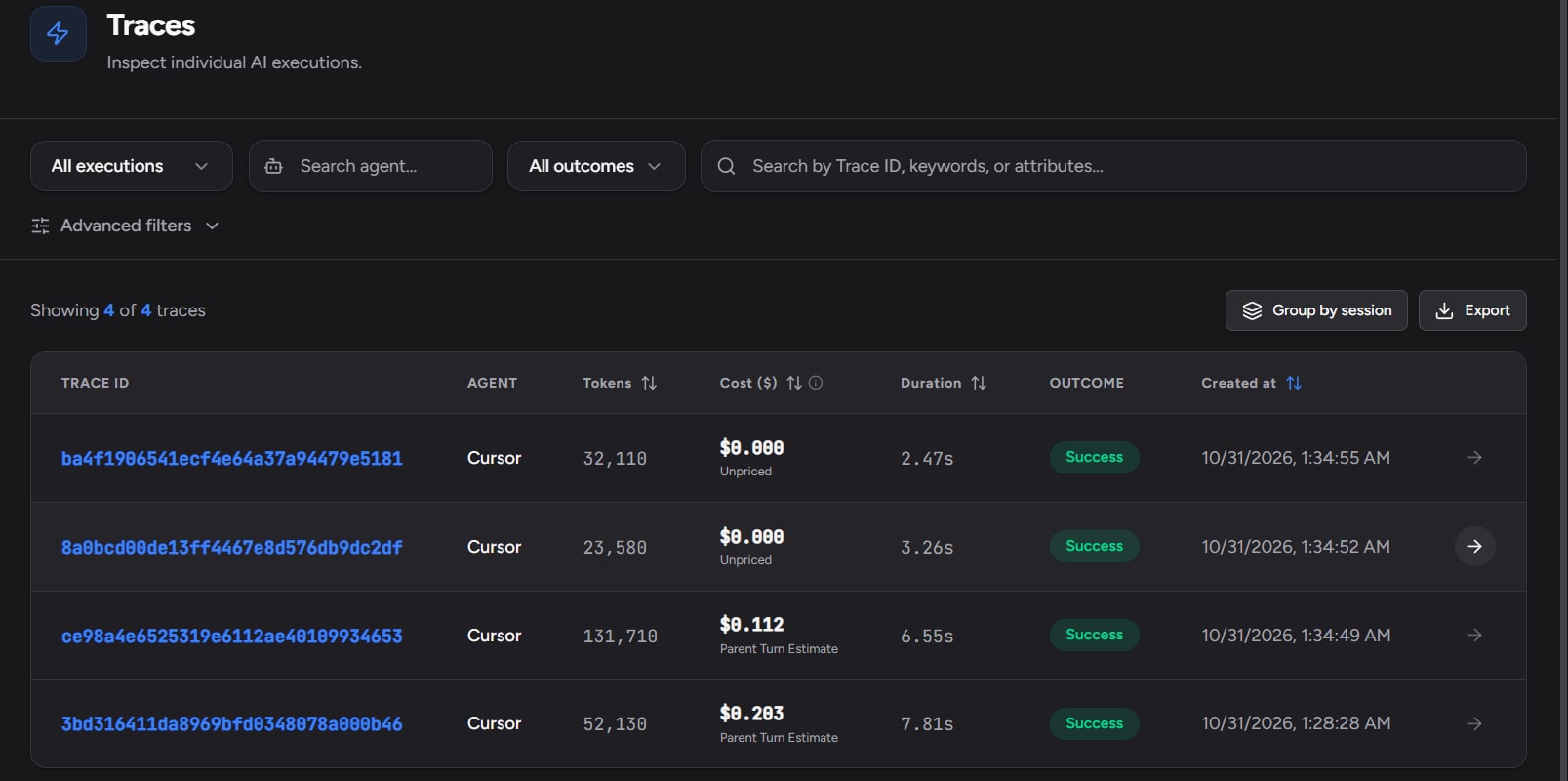
Open any chat and ask Cursor to do something real. In Traccia, open Sessions. That chat is the session; the message is the trace.
Step 5: Check the install
npx traccia-coding-harness statusYou want three things: a key present, Cursor hooks registered, and a recent last upload. Status never prints the key either. The installer's config file looks like this, and anything you leave out uses these defaults:
{ "enabled": true, "api_key": "tr_live_...", "endpoint": "https://api.traccia.ai/v2/traces", "redact": true, "log_prompts": true, "log_tool_details": true, "log_tool_content": true, "attachments": true}To remove it later, run npx traccia-coding-harness uninstall cursor, then restart Cursor.
Investigating a Cursor Session That Went Wrong
This is where tracing earns its place. The walkthrough below is an illustrative session, but every element in it is something the Cursor integration records.
The scenario
A developer asks Cursor: "The /orders endpoint returns 500 when the cart is empty. Fix it." Cursor reads the handler, edits three files and runs npm test. Two tests fail. Cursor does not stop. It edits a fourth file, runs the tests again on a narrower pattern, and replies: "Fixed the empty-cart case. Tests pass." The next morning, a different endpoint is returning 500s in staging.
Step 1: Find the message
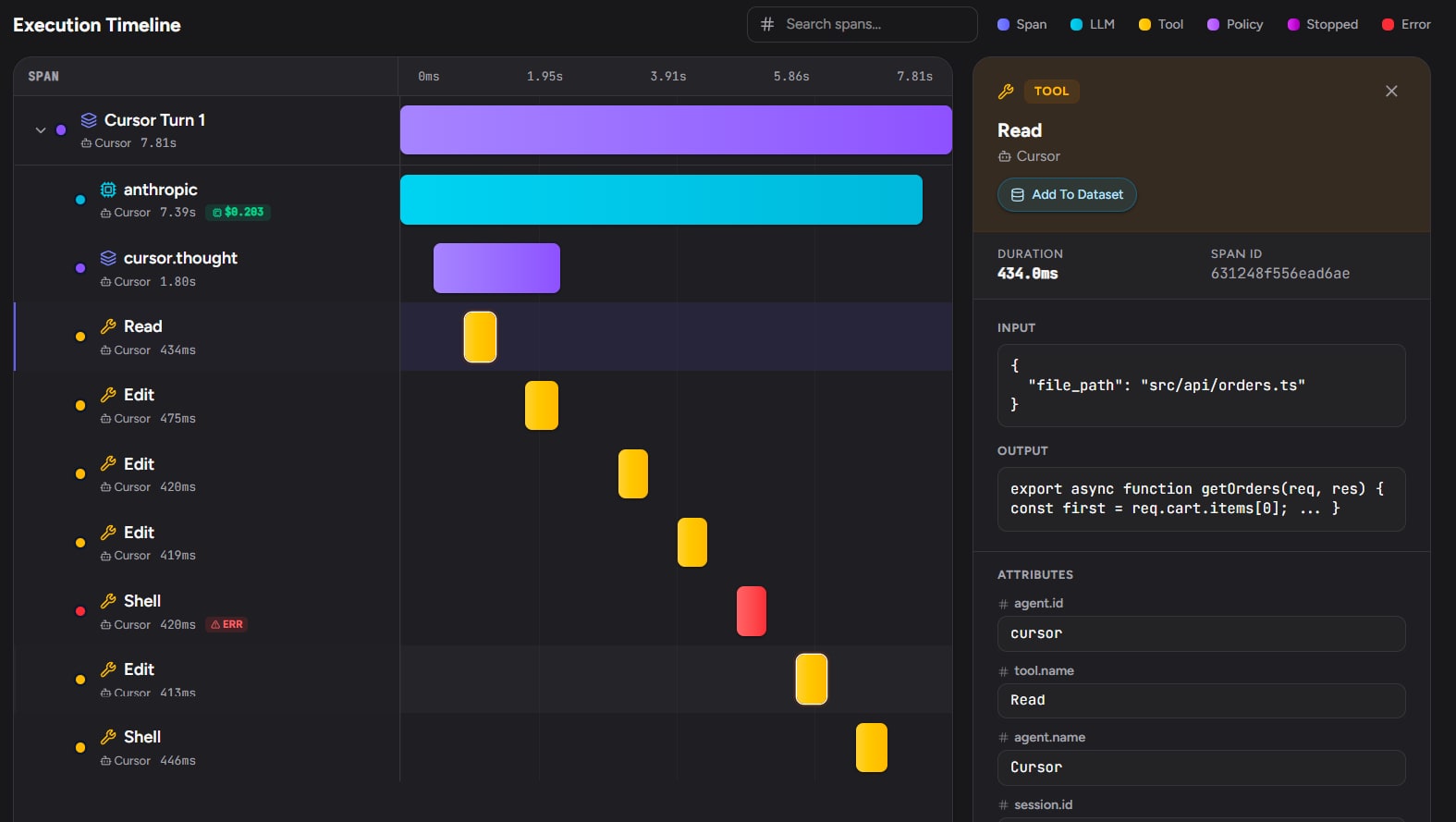
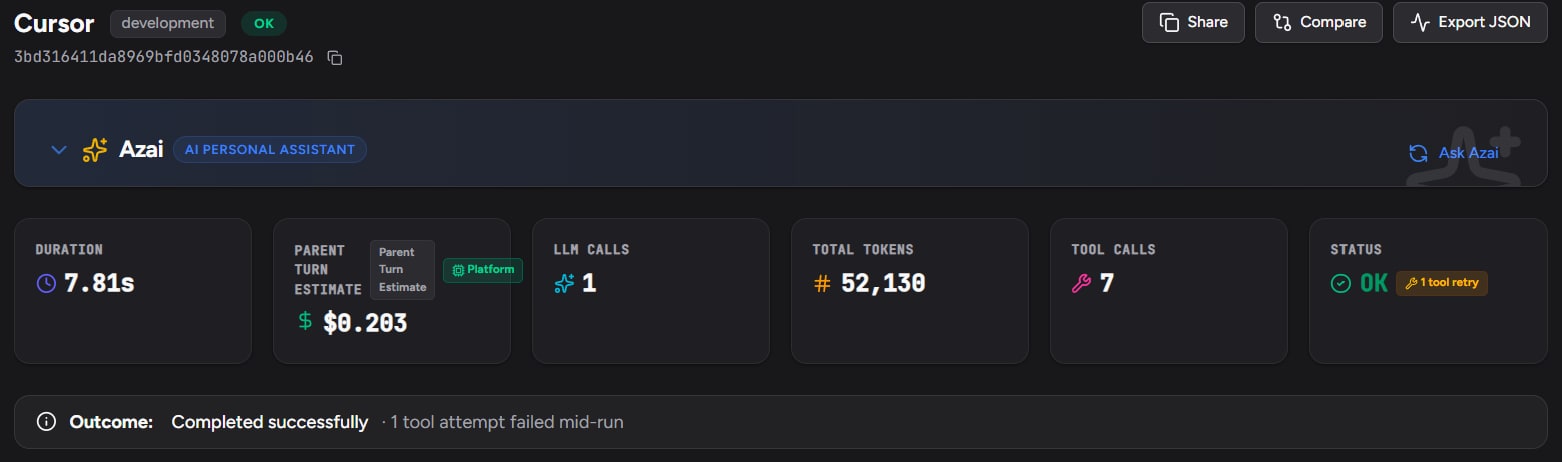
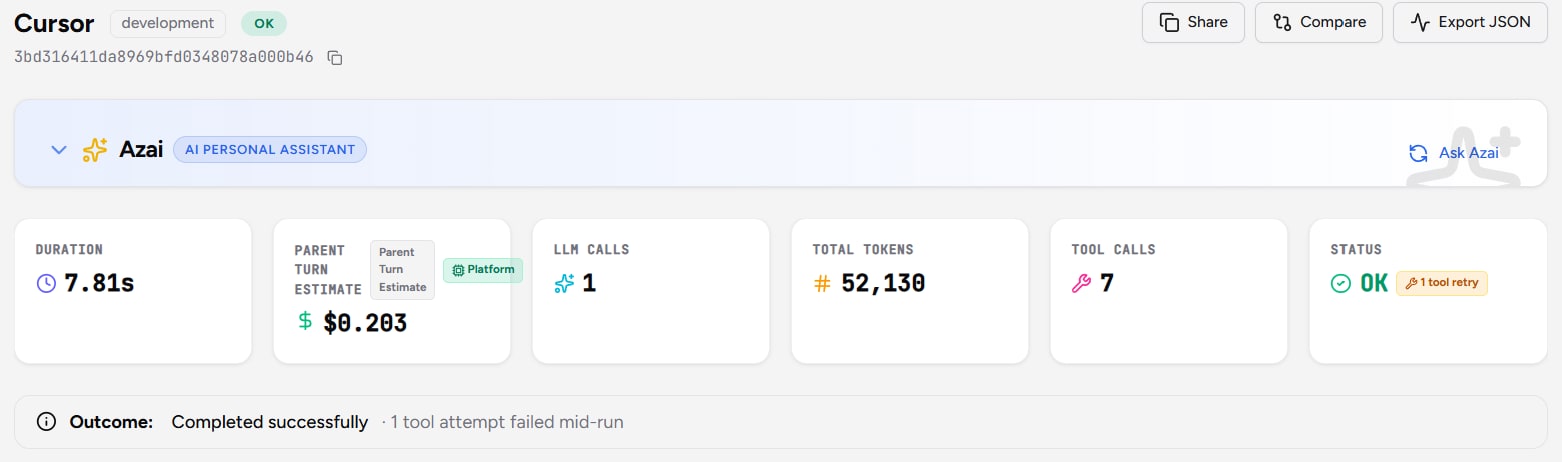
Open Sessions and find the chat. Each message is its own trace, so the change is not buried in a long conversation. The turn shows Success. That is expected: a failed tool does not fail the turn. The turn is an error only when the turn itself fails. Open the trace, though, and the summary tells you to look closer: the status carries a tool retry badge, and the outcome line reads "Completed successfully · 1 tool attempt failed mid-run".
Step 2: Read the tool spans in order
Reading the spans answers the questions the summary did not:
- Which files changed? Four, not three, including a test file. A file span is added only when no tool span already covers that path, so each file appears once.
- Which commands ran? Two. Each shell span holds the command and its output together, so
npm testand its failure sit side by side. - What failed? The first
npm test. Its span keeps the error: two failing tests inmoney.test.ts. - Did it retry, and how? It edited the test, not the code, then ran
npm test -- orders, which never runsmoney.test.ts. "Tests pass" is true for the command it chose.
The staging bug is now a short search: the change to src/lib/money.ts, which other endpoints also use.
Step 3: Check the cost of the detour
The trace shows the tokens for the turn and, for a named model, a Parent Turn Estimate. If the context grew past what the model could hold, context compaction appears nested on the turn. Compare this message with the rest of the chat: a fix that should take one edit and one test run took four edits and two runs.
The defaults capture all of this. Turn off log_tool_details and you keep the spans, their timing and their status, but not the file paths or commands. Turn off log_tool_content and you lose the test output. See Privacy for the trade-off.
Tokens and Cost: Estimate vs Billed
Cursor bills through plans, included usage and usage-based charges, and none of that shows up in a token count. So Traccia labels every Cursor cost with what it actually is:
| What happened | What the figure is | Label |
|---|---|---|
| A named model, no team key saved | API list price for the turn: uncached input, cache read, cache write and output | Parent Turn Estimate |
A team admin key saved as cursor_team_api_key, and Cursor has published the turn | Cursor's actual charge for that turn | Cursor Billed |
| Auto mode | Tokens only, because Cursor does not name the model | Unpriced |
| An unnamed model, or one with no catalog price | Tokens only | Unpriced |
One turn, two numbers
An illustrative comparison, using the message from the walkthrough:
| Right after the turn | About an hour later, with a team key | |
|---|---|---|
| Label | Parent Turn Estimate | Cursor Billed |
| Where the number comes from | Traccia's rate table at API list price | The usage event Cursor publishes for that turn |
| Use it for | Comparing chats, models and teams | Reconciling with what Cursor charges |
The two can differ, and that is expected. Your Cursor plan can include the same calls until its quota is used, so a turn with a real list price may cost you nothing extra. The estimate tells you what the work is worth at API prices; Cursor Billed tells you what Cursor charged.
- Cursor Billed takes time. Cursor publishes usage after the turn, often about an hour later. A turn stays pending until its usage arrives, or for 6 hours. Each usage event is applied once.
- Plan quota stays in Cursor. How much included usage is left is on Cursor's usage page, not in Traccia.
- Auto mode is a blind spot for dollars, not for tokens. You still see token counts and every tool span.
For how this rolls up across agents and teams, see AI Agent Cost Attribution.
Security Signals and Alerts for Cursor
After Run policies check traces after they land. Each can be scoped to the organization, a workspace, or one Agent ID. Cursor traces arrive under the Agent ID cursor, so scope to that, or to the workspace your team's key belongs to. They need nothing beyond the hooks you installed.
| Scenario | Template | Starting point | Tune it |
|---|---|---|---|
| A message runs the same failing test over and over, or loops through files | Tool Storm Alert | More than 25 tool calls in one run | In Cursor a trace is one message, so the limit is per message, not per chat |
| A team's Cursor spend jumps after a model or workflow change | Cost Spike Alert | Sum of cost above $100, checked daily | Set it from a week of real chats. Unpriced turns, including Auto mode, add nothing |
| Someone picks a model the team has not approved | Unapproved Model Alert | Allowed list of gpt-4o and gpt-4o-mini | Replace the list with the models your team uses in Cursor |
On the Review step, run Simulate Last 7 Days. It replays the draft against last week's traces and reports how many would have matched, before you spend a policy slot on it. Then activate it in Observe with Email Alerts on, since alerts default to Off. The email usually follows within about 30 seconds of a violation opening.
Reading a trace for security, not just cost
None of these templates knows that a command was suspicious. They count, sum and compare. For the incident and the vulnerabilities above, the value is in what you can go back and read:
- After a prompt-injection advisory like CVE-2026-31854: open the turns where the agent read external content, and check which shell commands followed in the same turn.
- After a Git-hooks advisory like CVE-2026-26268: look for file or tool spans that wrote under
.git/. Agents rarely have a reason to touch.git/hooksor.git/config. - After any advisory: knowing which chats ran, and when, tells you which sessions to review first.
Privacy: What Leaves the Laptop
Cursor chats contain source code, file paths and sometimes credentials. Decide what leaves the machine before you roll out, not after. Redaction is on by default: API keys and tokens are scrubbed on the device, before upload. Four more switches turn off whole categories of content:
| Setting | Set to false to stop sending |
|---|---|
log_prompts | Prompts, replies and thinking |
log_tool_details | Tool arguments and file paths |
log_tool_content | Tool results, such as command output and file contents |
attachments | Files read from Cursor's local database |
redact | Turns secret redaction off. Leave this true |
A metadata-only configuration
For a client codebase or a regulated repository, commit this as .cursor/traccia.json. A repository's file overrides ~/.traccia/harness/config.json for that repository, whoever opens it:
{ "enabled": true, "redact": true, "log_prompts": false, "log_tool_details": false, "log_tool_content": false, "attachments": false}With all four content switches off, you still get the shape of every turn: which tools ran, how long they took, whether they failed, and the tokens and cost. That is enough for cost and reliability work. You give up the parts of the walkthrough that depend on content: file paths, commands and test output.
What Traccia Cannot See or Stop in Cursor
What it cannot see
Traccia's view of Cursor is the agent's view, through its hooks. Anything that runs beside the agent is outside it:
- Extensions. The tampered extension in October 2026 ran in Cursor's extension host. Its SSH key, tunnel and persistence would not appear in any trace. Use endpoint security and Cursor's advisories for that.
- What Git runs on its own. A Git hook or helper started by Git is not a tool call. You see the agent's
git status, not what Git ran next. - Your own terminal. Commands you type in a terminal tab are not the agent's.
- Subagent token counts. A subagent span omits token counts rather than showing zero. A blank means not reported, not free.
What it cannot stop
Traccia cannot stop a Cursor command before it runs. The Cursor integration page says it directly: "Spend Cap and Guardrails apply to SDK and Gateway calls, not to these sessions." Dangerous Shell Commands, the template that denies rm -rf, does not block a terminal you did not instrument.
The brake is in Cursor. Its docs describe three run modes, set in Settings → Agents → Approvals & Execution:
| Cursor run mode | What it does |
|---|---|
| Auto-review (default) | Allowlisted calls run immediately. Other shell commands run in the sandbox when possible. Calls that cannot use the sandbox go to a classifier |
| Allowlist | Actions on your allowlist run without approval. Sandboxing is optional for supported shell commands |
| Run Everything | Every tool call runs automatically, with no sandbox and no classifier |
Cursor also documents File-Deletion Protection, which stops the agent deleting files automatically, including with rm, and External-File Protection, which stops it creating, changing or deleting files outside the workspace without approval. Cursor's own docs note that the classifier can make mistakes. CVE-2026-31854 showed an allowlist can be bypassed, and CVE-2026-26268 showed a sandbox can be escaped. Keep Cursor updated, prefer Auto-review over Run Everything, and leave the protections on. Then use Traccia to check those settings against what actually ran.
Cursor chat
Agent you build, in govern()
Traccia's preventive policies do apply to agents you build yourself. An internal ops agent with a shell tool, wrapped in govern(), can have Dangerous Shell Commands, High-Risk Tool, Loop Cap and Spend Cap checked before each call. For the difference between watching and enforcing, see AI Observability vs AI Governance.
Rolling Out to a Team
- One workspace and ingestion key per team, so traces stay isolated. The installer accepts
TRACCIA_API_KEYon the command line, so it fits in a laptop setup script. Each developer still restarts Cursor once. - Set the content policy per repository with a committed
.cursor/traccia.json. - Save
cursor_team_api_keyon day one. Your first week of data, the one you size alerts from, is then real Cursor charges rather than estimates. - Plan for volume. Each stored span is one event: a model call, a tool call or an agent step. A busy Cursor message can be a dozen. Free includes 50,000 events a month, Team ($299 a month) 2 million, Business ($799 a month) 10 million, with no automatic overage charges. Active policies: 1 on Free, 3 on Team, 15 on Business. See Pricing.
Troubleshooting Cursor Tracing
| Symptom | What to check |
|---|---|
| No sessions at all | Quit Cursor fully and open it again; it reads ~/.cursor/hooks.json only at startup. Then run npx traccia-coding-harness status. |
| Status shows no key | Re-run the install and paste the key. Cursor reads ~/.traccia/harness/config.json, not your terminal. |
| Hooks registered, but no recent upload | Read ~/.traccia/harness/cursor.log. Check that enabled is true and that a repo's .cursor/traccia.json is not turning it off. |
| Only one repository is traced | You installed with --project. Run the install again without it. |
| Tools, but no prompt, reply or tokens | That is the Cursor CLI. Those traces are marked incomplete by design. |
| Cost shows Unpriced | Auto mode, an unnamed model, or a model with no catalog price. |
| Cost still shows Parent Turn Estimate | No cursor_team_api_key saved, or Cursor has not published the turn yet (often about an hour). |
| Prompts, paths or tool output are missing | Check log_prompts, log_tool_details, log_tool_content and attachments, in the config file and the repo's .cursor/traccia.json. |
Frequently Asked Questions
What is Cursor observability?
It is the record of what Cursor's agent did in each chat: the prompt and reply, every shell, MCP and file tool with its input and output, subagents, tokens and cost. In Traccia, each chat becomes one session and each message one trace you can read, price and alert on.
Does Cursor support OpenTelemetry?
Not natively. Traccia uses Cursor's hooks instead. npx traccia-coding-harness install cursor registers them, buffers each turn on your machine and uploads it as an OpenTelemetry trace.
Would Traccia have caught the tampered Claude Code extension in October 2026?
No. Extensions run outside the agent's hooks, so their activity is not traced. Traccia records what Cursor's agent does. Use Cursor's advisories and your endpoint security for extensions.
Is the cost in Traccia my actual Cursor bill?
Only when the label says Cursor Billed, which needs a team admin key saved as cursor_team_api_key. Parent Turn Estimate is the API list price for the turn, and your Cursor plan may already cover those calls.
Can Traccia block rm -rf in Cursor?
No. Preventive policies run through the SDK's govern() or the Gateway, and Cursor chats use neither. Use Cursor's run modes, sandbox and File-Deletion Protection to stop commands, and Traccia to see what ran.
Does it work with the Cursor CLI?
Yes, with less detail. The CLI does not send the prompt, the reply or token counts, so those traces include tool spans and are marked incomplete.
References
- Traccia Docs: Cursor Integration (https://traccia.ai/docs/integrations/cursor/)
- Traccia Docs: Policies (https://traccia.ai/docs/platform/policies/)
- Traccia Docs: Tool Storm Alert (https://traccia.ai/docs/platform/policies/tool-storm-alert/)
- Traccia Docs: Cost Spike Alert (https://traccia.ai/docs/platform/policies/cost-spike-alert/)
- Traccia Docs: Unapproved Model Alert (https://traccia.ai/docs/platform/policies/unapproved-model-alert/)
- Traccia Docs: Dangerous Shell Commands (https://traccia.ai/docs/platform/policies/dangerous-shell-commands/)
- Traccia Pricing (https://traccia.ai/pricing/)
- Blog: Claude Code Observability (https://traccia.ai/blog/claude-code-observability/)
- Blog: What Is AI Agent Observability? (https://traccia.ai/blog/ai-agent-observability/)
- Cursor Docs: Run modes (https://cursor.com/docs/agent/security/run-modes)
- Cursor Docs: Hooks (https://cursor.com/docs/hooks)
- Cursor: Sandbox escape via Git hooks, CVE-2026-26268 (February 13, 2026) (https://github.com/cursor/cursor/security/advisories/GHSA-8pcm-8jpx-hv8r)
- Cursor: Arbitrary code execution via prompt injection and whitelist bypass, CVE-2026-31854 (March 9, 2026) (https://github.com/cursor/cursor/security/advisories/GHSA-hf2x-r83r-qw5q)
- Cursor on X: statement on the modified Claude Code extension (October 2026) (https://x.com/cursor_ai/status/2116074289053175808)
- Sophos: Malicious Claude Code extension distributed through Cursor marketplace (October 2026) (https://www.sophos.com/en-us/blog/malicious-claude-code-extension-distributed-through-cursor-marketplace)
- The Register: Anthropic: That Claude Code extension compromise... couldn't be us (October 30, 2026) (https://www.theregister.com/cyber-crime/2026/10/30/anthropic-that-claude-code-extension-compromise-couldnt-be-us/5306682)
Traccia docs, pricing and external sources read on October 31, 2026. Research cutoff October 30, 2026.
Try it on one Cursor chat
Create an ingestion key, run one command, restart Cursor and do an hour of real work. Then compare the tool spans with what the chat told you.