TRACCIA EVALS · ENGINEERING GUIDE
Using Jev for AI Evals in Traccia
A comprehensive engineering guide to Jev Decision in Traccia Evals — from configuring bounded semantic scorers and calibrating probability thresholds, to running dataset experiments and automating evals via the Python and TypeScript SDKs.
Key takeaways
- Bounded probabilities over paragraphs. Jev outputs a continuous probability (0.0 to 1.0) instead of free-form text, eliminating JSON schema parsing failures and prompt injection vulnerabilities in evaluation pipelines.
- Three specialized primitives. Each Jev scorer supports up to five questions using Yes/No (Noul), Pick a Label (Choice), or Scale (Score) primitives to match the mathematical shape of your evaluation criteria.
- Strict boolean conjunction. In Traccia, a dataset row passes only if every question in a Jev scorer clears its configured threshold, and every attached scorer on that row succeeds.
- Dual platform & SDK symmetry.A Jev Decision scorer built in Traccia's web console can be invoked seamlessly from Python or TypeScript SDKs by name, persisting results as shared team experiments.
- Question-level visibility. Traccia experiments provide granular score chips per question alongside trace links, giving engineering teams root-cause diagnostics when an agent fails an evaluation.
Introduction
Large language models are inherently non-deterministic, making traditional software unit testing insufficient. A prompt adjustment or foundation model upgrade can silently introduce hallucinations, factual drift, or behavioral regressions. LLM evaluation (evals) provides the measurement framework to quantify model behavior—acting as automated quality gates that benchmark candidate completions against concrete semantic criteria before changes reach production.
Historically, engineering teams relied on LLM-as-a-judge—prompting general-purpose models (such as GPT-4 or Claude) to critique responses and emit JSON verdicts. While flexible, this pattern incurs high token latency, substantial inference costs, non-deterministic phrasing, and brittle parsing failures when judges output conversational preamble instead of strict schemas.
This is where Jev Decision from TypeSafe AI fundamentally transforms evaluation. Built as a compact "System One" model, Jev does not generate open-ended narrative text. Instead, it directly computes a calibrated probability distribution (0.00 to 1.00) over bounded semantic hypotheses. Rather than parsing an LLM monologue to check factual grounding, Jev returns an exact probability like 0.88.
Integrated natively into Traccia's evaluation surface, Jev surfaces three core decision primitives:
- →Yes / No (Noul) — Evaluates binary propositions (e.g., grounding, safety, compliance).
- →Pick a Label (Choice) — Classifies responses into discrete failure modes for root-cause triage.
- →Scale (Score) — Grades qualitative dimensions along an ordered discrete scale (e.g., severity 1–5).
By standardizing evaluations as calibrated numeric probabilities, Jev gives engineering teams reproducible, apples-to-apples benchmarking across prompt iterations, fine-tuned checkpoints, and model providers without prompt drift or parser brittleness.
Where Jev Is Used Inside Traccia
In the current Traccia platform architecture, Jev lives directly inside the Evaluate surface. Rather than treating evaluation as an afterthought or requiring engineers to configure independent proxy servers, Traccia incorporates Jev Decision as a native evaluator asset. Scorers created under Evaluate → Scorers are fully decoupled from individual prompt templates and datasets, meaning a single well-calibrated Jev scorer can benchmark responses from OpenAI, Anthropic, Google Gemini, or self-hosted open-weights models without code changes.
Traccia orchestrates all communication with TypeSafe AI's endpoints behind the scenes. When a batch run is launched, Traccia's evaluation engine handles concurrency queuing, payload serialization, rate limit backoff, and socket timeouts. This guarantees that large evaluation jobs running against hundreds of golden records execute reliably without dropping items or corrupting experiment tallies.
You interact with Jev across four key touchpoints: creating reusable checklists in Evaluate → Scorers, validating edge cases in real time with Score One Example, running batch evals inside Prompt Playground, and invoking programmatic evaluation suites directly within CI/CD pipelines via Traccia's Python and TypeScript SDKs.
| Where | What you do with Jev |
|---|---|
| Evaluate → Scorers | Create a Jev Decision scorer, add up to five questions, and set the pass condition. |
| Score One Example | Send one input/output/expected example to Jev and inspect the returned probability. Nothing is saved. |
| Run On A Dataset | Attach the saved Jev scorer to a dataset run and save the results as an experiment. |
| Python / TypeScript SDK | Pass the scorer name to evaluate() and provide the TypeSafe key as typesafe. |
These locations are documented across Traccia's Scorers, SDK Evaluate, and TypeScript SDK pages.
Set Up a Jev Decision Scorer
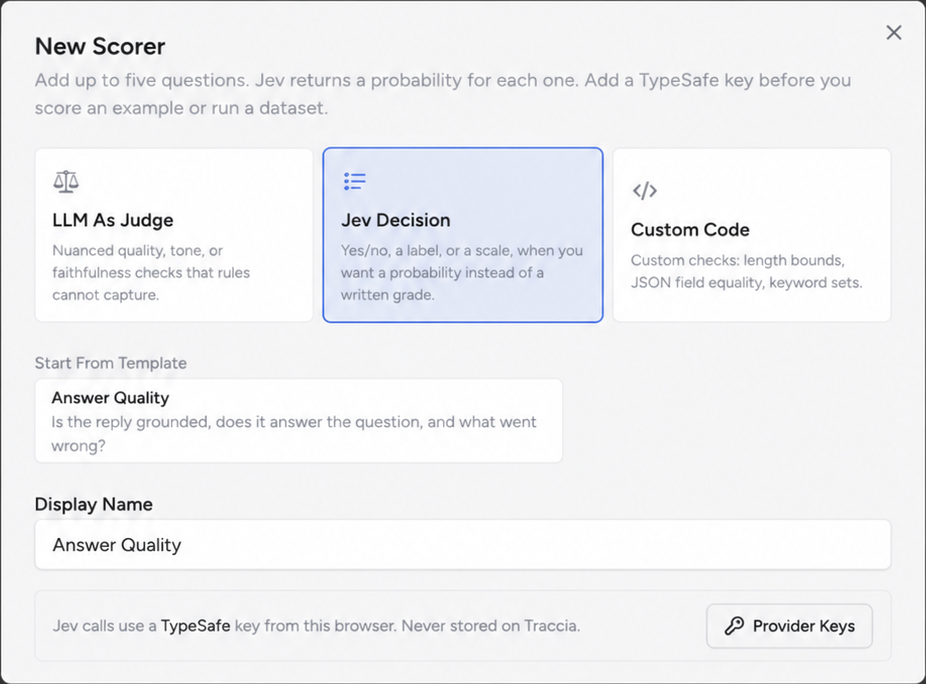
Creating a Jev Decision scorer in Traccia is designed to be frictionless. Navigate to Evaluate → Scorers and select New Scorer. Choose Jev Decisionfrom the available scorer types. You will be prompted to provide your TypeSafe API key. In line with Traccia's zero-trust security architecture, this provider key is stored in your client browser session and is never persisted on Traccia backend servers.
When composing questions for a Jev scorer, best practice dictates following the principle of atomic proposition design. Each question should evaluate a single, well-defined dimension—such as factual grounding, absence of toxicity, or adherence to output schemas. Avoid compound questions like "Is the answer grounded and concise?" because a low probability score leaves engineers unable to determine whether the model hallucinated or was simply verbose. Traccia allows up to five focused questions per Jev scorer, keeping evaluation criteria modular, interpretable, and computationally lean.
typesafe). It is securely maintained in local storage.The Three Jev Question Types in Traccia
Traccia directly exposes TypeSafe AI's core decision primitives as three intuitive question formats. Because Jev operates as a specialized System 1 decision engine rather than a generic autoregressive text generator, it computes calibrated probability mass directly over semantic hypotheses. Selecting the appropriate primitive ensures that your evaluation gates produce reproducible, mathematically sound pass/fail determinations:
| Traccia form | Jev type | What it answers | Example |
|---|---|---|---|
| Yes / No | noul | A proposition is true or false. | Is the response grounded? |
| Pick a Label | choice | Which predefined category applies? | What failure mode is present? |
| Scale | score | Where does the response fall on an ordered scale? | How severe is the issue? |
1. Yes / No (Noul)
Ideal for binary factual, safety, and compliance assertions. You formulate a declarative hypothesis (e.g., "The response directly answers the user's inquiry without extraneous preamble" or "The completion is entirely substantiated by the provided reference context"). Instead of prompting an LLM to generate the text token "Yes" or "No", Jev directly calculates the probability P(hypothesis = true) along a continuous 0.00 to 1.00 spectrum.
You establish a quantitative pass threshold—typically 0.75 for general conversational tasks or 0.85 to 0.90 for high-liability legal, financial, or healthcare use cases. If the computed probability satisfies probability >= threshold, the question passes. This numeric threshold acts as an adjustable confidence dial, allowing engineering teams to balance precision and recall without rewriting prompts.
2. Pick a Label (Choice)
Designed for categorical classification and failure triage. When evaluating complex agent workflows, simply knowing that an answer failed is rarely enough; you need to understand whyit failed. In Choice mode, you define a discrete set of mutually exclusive outcome labels (for example: "factual_grounding_error", "retrieval_omission", "tone_mismatch", "none").
Jev evaluates the model generation against each label candidate and outputs a normalized probability distribution across the entire set. In Traccia, you designate which specific label represents the desired passing state (such as "none"). The run marks the check as passing only if the designated passing category wins the highest probability mass, providing instant root-cause telemetry across entire datasets.
3. Scale (Score)
Used when evaluation requires a graduated qualitative metric rather than a strict binary pass/fail. Scale rates responses across an ordered numeric spectrum—for example, mapping severity across 1 (Low), 2 (Medium), 3 (High), and 4 (Critical). You define the minimum passing threshold (such as a score >= 3), allowing for nuanced grading of qualitative dimensions like helpfulness, conciseness, or policy risk.
Under the hood, Jev computes probability weights across the discrete points on the scale, synthesizing an expected score. By defining an explicit minimum passing threshold (such as score >= 3.0), teams can enforce minimum quality standards while retaining granular scores to track incremental prompt improvements over time.
Score One Example Before a Full Run
Before launching an expensive evaluation across hundreds of golden dataset rows, Traccia provides an interactive Score One Example sandbox directly inside the scorer configuration view. You input a representative prompt, the candidate model response, and an optional expected reference answer. Traccia immediately dispatches the payload to Jev and renders the real-time probability outputs for every question in your checklist.
Crucially, this sandbox run is completely ephemeral—no experiment records are created, and no dataset versioning is touched. This immediate feedback loop lets engineers test edge cases, probe borderline completions (such as an answer that scores 0.69 against a 0.70 threshold), and verify that question phrasing produces the intended discrimination before committing to large-scale regression runs.
The live interactive output above showcases Jev simultaneously evaluating three complementary dimensions on a single candidate completion:
- Grounded (Yes/No: 0.82)— Jev computes an 82% calibrated probability that the response strictly derives from the supplied retrieval passages. Against a standard passing threshold of 0.75, this assertion passes.
- Answers The Question (Yes/No: 0.94)— Evaluates whether the generated text directly answers the user prompt without evasion or excessive fluff, passing decisively with 94% confidence.
- Failure Mode (Pick a Label: "unsupported claim")— Demonstrates the multi-class categorical primitive in action. While the primary quality checks passed, the failure classifier isolates a nuanced "unsupported claim" among alternative failure taxonomies, giving engineers pinpoint diagnostic visibility before running full-scale evaluations.
Testing individual edge cases highlights how slight phrasing variations in your evaluation questions influence Jev's probability calibration. By refining your threshold boundaries on single samples first, you avoid misconfigured pass rates in subsequent batch experiments.
Run Jev on a Dataset
Once your scorer is tested and calibrated, you can scale evaluation across curated golden datasets. Golden datasets in Traccia represent your test suite—consisting of representative customer prompts, edge-case inquiries, expected reference facts, and context documents. Rather than evaluating manually or relying on spot checks, batch evaluation tests how your model and prompt templates perform across hundreds of varied scenarios.
In Traccia's Prompt Playground, select your target model, open Run On A Dataset, choose your dataset version, and attach your Jev Decision scorer. When you trigger Run And Save Experiment, Traccia's evaluation worker pool automatically iterates through each dataset row, dispatches candidate inferences, bundles output pairs into Jev evaluation requests, applies configured thresholds, and records the entire run as an immutable, versioned experiment.
How Pass / Fail Works
Traccia implements strict boolean conjunction (AND semantics) for composite evaluations. Within a Jev Decision scorer, every individual question must meet its respective pass condition for the scorer as a whole to pass that row. For instance, if your checklist evaluates both Grounded (threshold 0.80) and Helpful (threshold 0.70), an answer scoring 0.92 on grounding but 0.65 on helpfulness will be marked as a failure.
Furthermore, if multiple scorers are attached to a dataset run (such as a Jev Semantic Scorer alongside a Python Regex Scorer and a maximum latency constraint), the dataset item passes only if all attached evaluators succeed. This multi-layered gating prevents subtle regressions where an agent delivers accurate answers that violate formatting constraints or latency SLAs.
| Jev result | Traccia action |
|---|---|
| Question probability reaches its pass line | That question passes. |
| Question probability stays below its pass line | That question fails. |
| Multiple questions are configured | The Jev scorer requires all configured questions to pass. |
| Multiple scorers are attached | The row passes only when every attached scorer passes. |
Use Jev from the Traccia SDK
While UI-driven evaluations in Prompt Playground excel during initial prototyping, production engineering teams require automated evaluation gates embedded in their code repositories and continuous integration pipelines. Traccia exposes full evaluation capabilities through its Python and TypeScript SDKs via the unified evaluate() function.
In your test script, reference the Jev scorer created in the UI by its identifier name, supply your model invocation task, and pass your TypeSafe API key in the provider keys dictionary. Traccia automatically manages asynchronous batching, streams real-time progress indicators in your terminal, computes per-item scores, and outputs a permanent experiment link to share with team members or embed in GitHub pull request comments.
from traccia import evaluateimport os
result = evaluate(    "support-helpfulness",    data="support-golden",    task=lambda inp: call_model(        prompt.compile(**inp)    ),    scorers=["Helpfulness"],    prompt="support-reply",    provider_keys={        "typesafe": os.environ["TYPESAFE_API_KEY"]    },)
print(result.url)
In Python, pass your TypeSafe API key via provider_keys={"typesafe": ...}. Traccia automatically bundles input payloads, sends batch inference requests to Jev, and generates an experiment URL.
Platform Dataset or Local Rows?
When invoking evaluate() from code, Traccia offers three data input modes. Depending on your testing environment, you can choose between versioned cloud datasets, ad-hoc inline rows, or purely local executions:
For automated CI/CD gating, referencing a Platform dataset ensures every developer and build runner tests against the exact same version-controlled test suite. For local exploratory loops, passing local dictionaries lets engineers test prompt hypotheses without creating permanent cloud artifacts until they are ready.
| Mode | What you pass | What happens |
|---|---|---|
| Platform dataset | Dataset name or UUID | Rows are fetched from Traccia and the run can be saved as an experiment. |
| Inline rows + persist | List of {input, expected, metadata} | Traccia creates an ephemeral SDK dataset and saves the experiment. |
| Local-only | Inline rows + persist=False | Results stay in process. No experiment URL or persistent dataset is created. |
For regular pull-request validation in CI pipelines, using Platform dataset ensures team-wide consistency against benchmark datasets. For rapid local experimentation, Local-onlylets engineers verify prompt modifications without cluttering the team's experiment dashboard.
Read the Jev Results in the Experiment
Once an evaluation run concludes, Traccia presents an interactive experiment inspection dashboard. Rather than showing an opaque overall pass/fail percentage, Traccia provides deep, multi-tiered visibility. At the top of the experiment view, aggregate KPI cards display the overall pass rate, mean score per question, total execution duration, and estimated USD model inference expenditure.
Beneath the summary KPIs, an interactive results table details performance across every individual golden dataset item. Each row features visual score chips displaying the exact probability computed by Jev, color-coded by passing status (emerald for pass, rose for failure). Clicking on any failed row opens a slide-over trace drawer displaying the raw prompt input, retrieved context chunks, model completion tokens, and Jev's posterior probability breakdown—enabling instant root-cause analysis.
| What to inspect | Why it matters |
|---|---|
| Overall pass rate | Shows how many dataset rows passed all attached scorers. |
| Pass rate by scorer | Shows which evaluator is creating failures across the dataset. |
| Jev question chips | Shows the individual probability or decision returned by each configured question. |
| Per-row output & expected answer | Lets you inspect the full evidence behind a surprising judgment. |
| Trace link | SDK evaluation items can retain trace identity so the run connects directly to execution evidence. |
Furthermore, Traccia supports side-by-side experiment comparisons. By selecting two evaluation runs (such as GPT-4o vs Claude 3.5 Sonnet, or Prompt v1 vs Prompt v2), the dashboard highlights exact pass-rate deltas and surfaces specific regression cases where a previously passing item began failing under the revised configuration.
Jev, LLM-as-a-Judge, and Custom Code
Traccia treats evaluation as a multi-layered discipline rather than a one-size-fits-all problem. Engineering teams often struggle when attempting to force all evaluations into general-purpose LLM judges, which are slow (taking 2 to 5 seconds per item), expensive (costing cents per call), and vulnerable to prompt injection or verbosity bias.
Depending on whether your criteria are deterministic, semantic, or open-ended, Traccia allows you to blend three complementary evaluation paradigms into a single unified scorer bundle:
| Evaluation need | Custom Code | Jev Decision | LLM-as-Judge |
|---|---|---|---|
| Exact match / deterministic check | Strong fit | — | — |
| Bounded Yes / No judgment | Possible when rules are deterministic | Designed for this | Possible (high latency / cost) |
| Bounded category / label | Possible when rules are deterministic | Designed for this | Possible (parsing required) |
| Graded semantic score | Limited | Designed for this | Possible |
| Nuanced narrative assessment | Limited | — | Designed for this |
Use custom Python/JS code for exact string matching, JSON schema syntax validation, or latency thresholds where logic is strictly deterministic. Use Jev Decision when evaluating bounded semantic criteria—such as grounding, policy adherence, tone consistency, or factual contradiction—at sub-second speeds (~200–400ms) with mathematical probability calibration and inherent resistance to prompt injection. Reserve general-purpose LLM-as-a-judge for subjective qualitative assessments where extensive narrative reasoning or freeform text critique is required.
What Jev Does Not Do in Traccia
To avoid architectural confusion, it is vital to recognize the operational boundaries of Jev Decision within Traccia. Jev Decision is an offline evaluation scorer. Its primary purpose is to grade dataset rows, provide statistical confidence metrics across experiments, and gate deployments in continuous integration pipelines.
It is not an inline proxy, a token sanitizer, or a live streaming firewall. Evaluation scorers run asynchronously or after completions have been generated; they are not intended to intercept live user traffic in real time.
Evaluation Scorers vs. Runtime Enforcement
Maintaining this strict architectural separation ensures that offline evaluation runs remain comprehensive, statistically sound, and unconstrained by production latency budgets, while production user-facing pipelines remain protected by dedicated low-latency gateway policies.
A Simple Jev Workflow
Standardizing on a structured evaluation loop transforms AI quality assurance from ad-hoc spot checking into an engineering discipline. In Traccia, evaluating with Jev is organized into four sequential phases—spanning prompt hypothesis, single-sample calibration, batch dataset execution, and continuous regression auditing.
This closed-loop lifecycle ensures that teams can rapidly iterate on prompt wording or candidate checkpoints in development, confidently enforce CI/CD release gates, and trace failing completions directly back to model context and token telemetry:
Formulate atomic hypotheses focusing on grounding, compliance, tone, or completeness.
Choose representation: Noul (Yes/No), Choice (Label), or Score (Scale).
Establish probability threshold (e.g. ≥ 0.80) or passing category label.
Send single test inputs to Jev to inspect raw probabilities and calibrate thresholds before batch runs.
Execute batch evaluations across test cases via Prompt Playground or SDK.
Persist inputs, completions, score chips, and trace spans with tag metadata.
Filter failing rows, inspect token-level spans, and identify failure root causes.
Track pass-rate deltas across prompt iterations or foundation model upgrades.
By following this systematic four-phase pipeline, teams establish reproducible quality guardrails that catch regressions before customer impact, benchmark model performance across vendor upgrades, and turn qualitative product requirements into mathematically enforceable release standards.
Summary
In Traccia, Jev Decision delivers structured, bounded semantic evaluation that bridges the gap between rigid deterministic checks and expensive open-ended LLM judges.
By transforming subjective evaluation criteria into well-calibrated continuous probabilities, Jev enables automated pass/fail gates that do not break when output phrasing fluctuates. Configured easily through Evaluate → Scorers, verified in the Score One Example sandbox, and executed seamlessly across datasets via Prompt Playground or SDKs, Jev equips teams with reliable metrics to build robust, trustworthy AI applications.
Whether you are auditing agent grounding, measuring policy compliance, or benchmarking prompt variants, integrating Jev Decision into Traccia Evals provides the mathematical clarity and operational speed necessary for production confidence.
References
- Traccia Docs: Scorers
- Traccia Docs: Evaluate in the SDK
- Traccia Docs: Run Experiments From Code
- Traccia Docs: TypeScript SDK API Reference
- TypeSafe AI: Introducing System One Models & Jev
- Langfuse: Using TypeSafe's Jev for evals
- DeepEval: Introducing Jev for Evals
- LangChain: Can Jev Be a Better Agent Evaluator?
- Braintrust: Eval agent responses with Jev
- Fiddler AI: Testing Jev for Coding Agent Evals
Documentation details in this article are based on the Traccia docs pages available in the current October 3, 2026 documentation snapshot.
Ready to evaluate your models with Jev Decision?
Configure Jev scorers in Traccia Evals, run dataset experiments, and monitor your AI agent quality with complete transparency.