OPENAI AGENTS SDK INTEGRATION
How to Trace OpenAI Agents with Traccia
One call to init() gives you complete trace visibility into every LLM call, tool invocation, and turn boundary — with token counts and USD costs — without modifying your agent logic.
The Challenge of Opaque LLM Calls
The OpenAI Agents SDK enables building autonomous, multi-step AI workflows with tool invocation, handoffs, and guardrails built directly into the runtime. An agent receives a request, determines required tool calls, executes actions, processes responses, and yields a final result inside a single Runner.run() call.
That autonomy turns agent execution into a black box. An 8-second execution time might stem from model latency, slow external API calls, or inefficient loops. Cost spikes stem from heavy token consumption across intermediate turns. Unexpected tool outputs can lead to hallucinated decisions.
Standard logging provides fragmented breadcrumbs that fail to peer inside this black box. Production systems need a complete execution trace: every LLM call, every tool invocation, every turn boundary, with exact timing, token counts, and USD costs.
Traccia delivers this through auto-instrumentation of the OpenAI Agents SDK, bringing complete visibility to multi-step agent workflows without requiring changes to application logic.
How Auto-Instrumentation Works
Calling init() at app startup triggers three automated steps:
- Package Detection: Traccia verifies the presence of
openai-agents(Python) or@openai/agents(TypeScript). Upon detection, the integration activates automatically withopenai_agents=Trueas the default setting. - Runtime Patching: Traccia transparently intercepts the Agents SDK runner, OpenAI API calls, and tool dispatch mechanisms. It creates OpenTelemetry spans across lifecycle boundaries: agent initialization, turn start and completion, LLM requests, and tool executions.
- Metric Generation: Alongside trace spans, Traccia generates standard OTel metrics including
gen_ai.client.token.usage,gen_ai.client.operation.duration,gen_ai.client.operation.cost,gen_ai.agent.runs,gen_ai.agent.turns, andgen_ai.agent.execution_time. Agent source code remains clean.
Install the required packages:
pip install traccia openai-agentsInitialize Traccia at the start of your application:
from traccia import initfrom agents import Agent, Runner
init()
agent = Agent(name="my-agent", instructions="You are helpful.")result = Runner.run_sync(agent, "Calculate 2+2.")
To disable the integration when using alternative frameworks:
init(openai_agents=False)# OR: export TRACCIA_OPENAI_AGENTS=false# OR: set openai_agents = false in traccia.toml [instrumentation]Info
Tracing an OpenAI Agent Step by Step
Consider a loan approval agent that evaluates applicant eligibility. The agent calls two tools in parallel — check_credit_score and verify_employment — before rendering a final decision.
import asyncio, osfrom dotenv import load_dotenvfrom agents import Agent, Runner, function_toolfrom traccia import init, stop_tracing, get_tracer
load_dotenv()init(api_key=os.getenv("TRACCIA_API_KEY"), agent_id="loan-approval-agent")
@function_tooldef check_credit_score(applicant_name: str) -> dict:    scores = {"Alice Smith": 750, "Bob Jones": 580, "Charlie Brown": 680}    return {"applicant_name": applicant_name, "credit_score": scores.get(applicant_name, 600)}
@function_tooldef verify_employment(applicant_name: str) -> dict:    status = {"Alice Smith": {"employed": True, "annual_income": 95000}, "Bob Jones": {"employed": True, "annual_income": 42000}}    return status.get(applicant_name, {"employed": False, "annual_income": 0})
loan_officer = Agent(    name="Loan Officer",    instructions="You evaluate loan applications.",    tools=[check_credit_score, verify_employment],)
async function main():    tracer = get_tracer("loan-approval-agent")    with tracer.start_as_current_span("loan_pipeline") as session_span:        session_span.set_attribute("session.id", "sess_loan_99482")        result = await Runner.run(loan_officer, "Evaluate loan for Alice Smith requesting $25,000.")        print(result.final_output)    stop_tracing(flush_timeout=1.0)
if __name__ == "__main__":    asyncio.run(main())
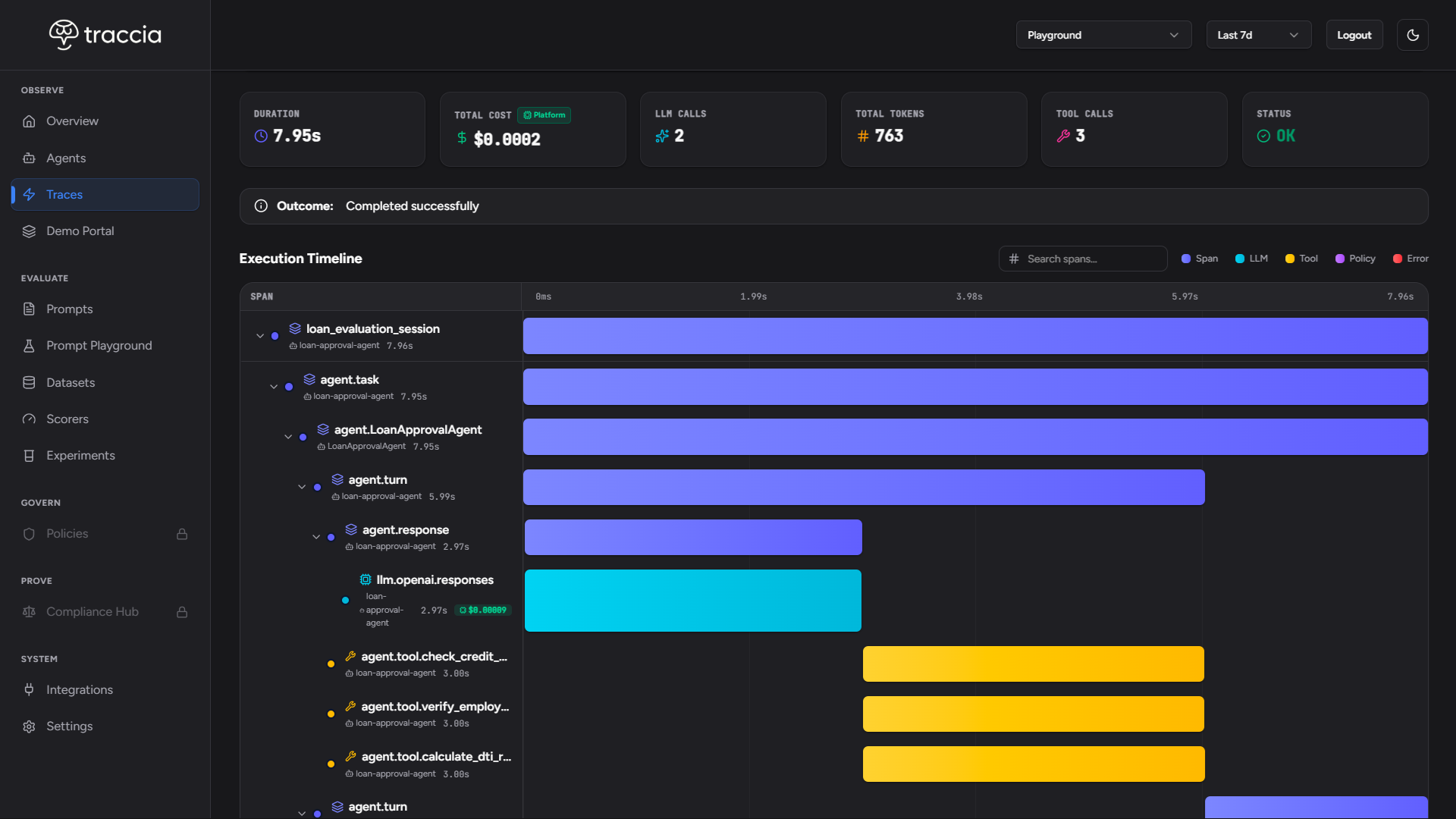
When this code executes, Traccia automatically records the complete trace hierarchy:
- Root Agent Run Span:
agent.run: loan_approval_agent— Tracks overall duration, status, and total cost. - Turn Spans:
agent.turn: 1— Captures each iteration of the agent loop. - LLM Generation Spans:
llm.openai.chat.completions— Captures model, prompt, response, input/output tokens, and dollar cost. - Tool Spans:
agent.tool: check_credit_scoreandagent.tool: verify_employment— Tracks parallel execution time and arguments.
Analyzing Traces in the Dashboard
Once collected, traces are visualized in the Traccia Dashboard with waterfall timelines, cost attribution, and turn-by-turn breakdowns.
What Traccia Automatically Captures
| Dimension | Captured Data | Value |
|---|---|---|
| Trace Hierarchy | Agent run -> Turns -> LLM calls -> Tool calls | Complete visibility into execution flow |
| Parallel Execution | Overlapping tool span start and end timestamps | Visual proof of concurrent tool execution |
| Token Breakdown | Input, output, reasoning (o1/o3), and prompt cache tokens | Precise token accounting per step |
| Cost Metrics | Per-model pricing lookup applied to token counts | Real-time USD cost per turn and agent run |
| Session Attributes | Custom attributes like session.id attached to root | Filtering and grouping by user or workflow |
Additional Configuration
Traccia supports configuration via code, environment variables, or a traccia.toml file:
Programmatic configuration:
from traccia import init
init(    api_key="tr_dev_...",    service_name="loan-service",    enable_costs=True,    openai_agents=True,    env="production",)
Environment variables:
export TRACCIA_API_KEY="tr_dev_..."export TRACCIA_SERVICE_NAME="loan-service"export TRACCIA_OPENAI_AGENTS=trueexport TRACCIA_ENABLE_COSTS=trueexport TRACCIA_ENV="production"Conclusion: Complete Agent Visibility
Building autonomous, multi-step workflows with the OpenAI Agents SDK doesn't mean operating in the dark. With Traccia's auto-instrumentation, calling init() at application startup gives you instant, comprehensive trace hierarchies across agent runs, turn boundaries, LLM calls, and parallel tool executions.
From real-time cost attribution down to prompt cache and reasoning token tracking, Traccia provides the observability foundation required to debug, optimize, and scale production OpenAI agents with confidence.
References
- Traccia (https://traccia.ai)
- Traccia Docs: OpenAI Agents SDK Integration (https://traccia.ai/docs/integrations/openai-agents)
- Traccia Docs: Configuration Reference (https://traccia.ai/docs/reference/configuration)
- Traccia Docs: Guardrail Detection (https://traccia.ai/docs/sdk/guardrails)
- Blog: Guardrails and Policy Enforcement for OpenAI Agents (https://traccia.ai/blog/openai-agents-guardrails-policy-enforcement)
- OpenAI Agents SDK (Python GitHub Repository) (https://github.com/openai/openai-agents-python)
See Traccia on your own agents
Set up auto-instrumentation for your OpenAI Agents SDK workflows in less than 5 minutes.