GEMINI SDK INTEGRATION
How to Trace Gemini Agents with Traccia
Gain instant visibility into every Gemini LLM call including prompts, completions, token usage, and cost, without changing a single line of application code.
The Challenge of Opaque LLM Calls
The Gemini SDK (google-genai in Python, @google/genai in TypeScript) makes it easy to call Google models, but a bare client.interactions.create() call yields minimal visibility into what actually happened. A slow response might stem from model latency, prompt size, or network conditions. A cost spike might come from unexpectedly long completions, thinking tokens, or cached context billing.
Standard application logs capture that a call was made, but fail to record the prompt sent, tokens consumed, or dollar cost incurred. Production systems need a complete record of every Gemini interaction: model, prompt, completion, token breakdown (including Gemini-specific thought tokens), and cost, all tied together for audit inspection.
Traccia delivers this through auto-instrumentation of the Gemini SDK, illuminating every interaction without changing application logic.
How Auto-Instrumentation Works
Calling traccia.init() at app startup triggers automatic detection and patching:
- Package Detection: Traccia checks for
google-genai(Python) or@google/genai(TypeScript). If present, Gemini instrumentation activates automatically with no extra flags required. - Runtime Patching: Traccia transparently wraps
GeminiNextGenInteractions.create(sync and async) so that every call toclient.interactions.create()is captured. - Span Generation: Each intercepted call produces an
llm.gemini.interactionspan carrying vendor, model, prompt, completion, token breakdown, and interaction chaining metadata.
Install the required packages:
pip install traccia google-genaiInitialize Traccia at the start of your application:
from traccia import initfrom google import genai
init()
client = genai.Client(api_key="GEMINI_API_KEY")response = client.interactions.create(    model="gemini-3.6-flash",    input="Write a short story",)
Info
Tracing a Gemini Call Step by Step
The following implementation builds an automated earnings-risk assessment feature. A sanity check verifies raw text input, an extraction step parses structured figures into JSON, financial metrics are computed, and a final Gemini call produces a plain-language risk assessment.
import jsonimport refrom traccia import init, span, stop_tracingfrom google import genai
init(api_key="<YOUR_TRACCIA_API_KEY>")
client = genai.Client(api_key="<GEMINI_API_KEY>")
earnings_snippet = (    "Algen reported Q3 revenue of $48.2M, up from $41.5M a year "    "ago. Operating expenses came in at $39.6M, compared to $35.1M in "    "Q3 last year.")
def extract_figures(snippet, previous_interaction_id=None):    with span("extract_figures") as tool_span:        extraction = client.interactions.create(            model="gemini-3.6-flash",            input=(                "Extract these as JSON with keys revenue_current, "                "revenue_prior, opex_current, opex_prior (numbers in "                "millions, no currency symbols):\n\n" + snippet            ),            previous_interaction_id=previous_interaction_id,        )        raw_output = extraction.output_text.strip()        if raw_output.startswith("```"):            raw_output = re.sub(r"^```(?:json)?\s*", "", raw_output, flags=re.IGNORECASE)            raw_output = re.sub(r"\s*```$", "", raw_output)        figures = json.loads(raw_output)        tool_span.set_attribute("figures.parsed", figures)        return figures, extraction.id
with span("earnings_risk_assessment") as session_span:    session_span.set_attribute("company", "Algen")
    sanity_check = client.interactions.create(        model="gemini-3.6-flash",        input=(            "In one sentence, confirm whether this text reports "            "quarterly revenue and operating expense figures:\n\n"            + earnings_snippet        ),    )    session_span.set_attribute("sanity_check.text", sanity_check.output_text)
    figures, extraction_id = extract_figures(earnings_snippet)
    revenue_growth = (        (figures["revenue_current"] - figures["revenue_prior"])        / figures["revenue_prior"]    )    operating_margin = (        (figures["revenue_current"] - figures["opex_current"])        / figures["revenue_current"]    )
    session_span.set_attribute(        "metrics.revenue_growth_pct", round(revenue_growth * 100, 2)    )    session_span.set_attribute(        "metrics.operating_margin_pct", round(operating_margin * 100, 2)    )
    assessment = client.interactions.create(        model="gemini-3.6-flash",        input=(            f"Revenue grew {revenue_growth:.1%} year-over-year and "            f"operating margin is {operating_margin:.1%}. In two "            "sentences, assess whether this points to improving or "            "deteriorating financial health."        ),        previous_interaction_id=extraction_id,    )
    session_span.set_attribute("assessment.text", assessment.output_text)    print(assessment.output_text)
stop_tracing(flush_timeout=1.0)
Key highlights of this implementation:
- No manual span wrapper required on bare Gemini calls
- Automatic prompt and completion token tracking per step
- Automatic interaction chaining via
previous_interaction_id - Custom session attributes attached directly to the root span
Analyzing Traces in the Dashboard
Upon completion of the run, Traccia generates a trace containing your root span, the three automatically captured llm.gemini.interaction spans, and the single tool span wrapping the extraction call.
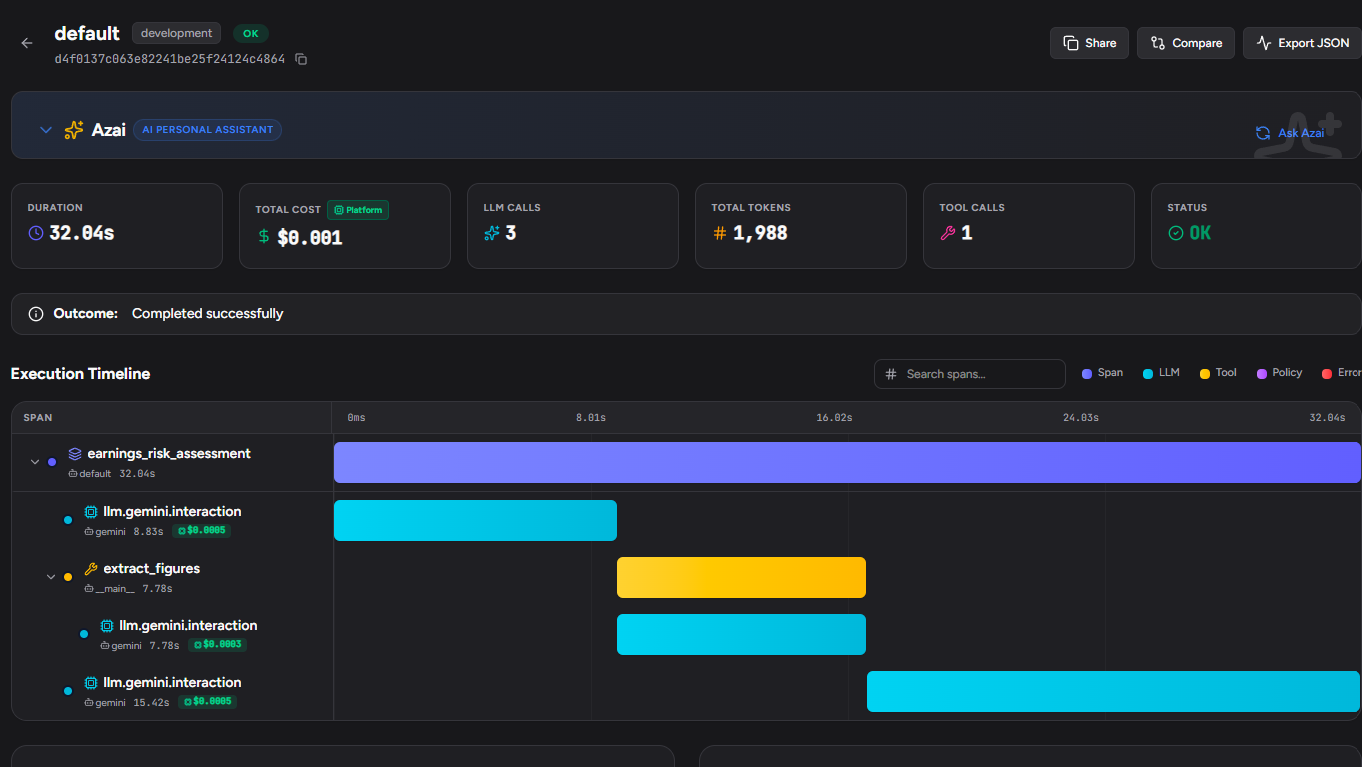
What Traccia Automatically Captures
| Dimension | Captured Data | Value |
|---|---|---|
| Trace Hierarchy | Root span -> Interaction spans -> Tool spans | Complete visibility into execution flow |
| Interaction Chaining | previous_interaction_id linking calls across turns | Visual decision lineage across multi-step flows |
| Token Breakdown | Input, output, and Gemini thought tokens | Precise token accounting per interaction |
| Cost Metrics | Gemini model pricing lookup applied to token counts | Real-time USD cost per Gemini call and session |
| Session Attributes | Custom attributes like company, metrics.revenue_growth_pct attached to root | Filtering and grouping by business entity |
Additional Configuration
Traccia supports programmatic initialization, environment variables, or a traccia.toml configuration file:
Programmatic configuration:
from traccia import init
init(    api_key="tr_dev_...",    service_name="gemini-service",    enable_costs=True,    gemini=True,    env="production",)
Environment variables:
export TRACCIA_API_KEY="tr_dev_..."export TRACCIA_SERVICE_NAME="gemini-service"export TRACCIA_GEMINI=trueexport TRACCIA_ENABLE_COSTS=trueexport TRACCIA_ENV="production"Conclusion: Complete Agent Visibility
Tracing Google Gemini interactions shouldn't require manual span management or boilerplate instrumentation code. With Traccia's auto-instrumentation, calling init() gives you immediate, end-to-end visibility into every LLM request, completion, token breakdown (including Gemini thought tokens), and real-time cost attribution.
Whether you build Python services with google-genai or TypeScript applications with @google/genai, Traccia delivers the telemetry precision required to run production AI workloads with confidence.
References
- Traccia (https://traccia.ai)
- Traccia Docs: Gemini Integration (https://traccia.ai/docs/integrations/gemini)
- Traccia Docs: Configuration Reference (https://traccia.ai/docs/reference/configuration)
- Google GenAI SDK (Python GitHub) (https://github.com/googleapis/python-genai)
- Google GenAI SDK (TypeScript GitHub) (https://github.com/googleapis/nodejs-genai)
See Traccia on your own agents
Set up auto-instrumentation for your Gemini and multi-agent workflows in less than 5 minutes.